
Why CPU Frequency Matters More Than RAM for MT4
Trade
08.09.2026

Running two trading accounts manually is manageable. Running five, ten or twenty — especially across different brokers or prop firms — is a different problem.
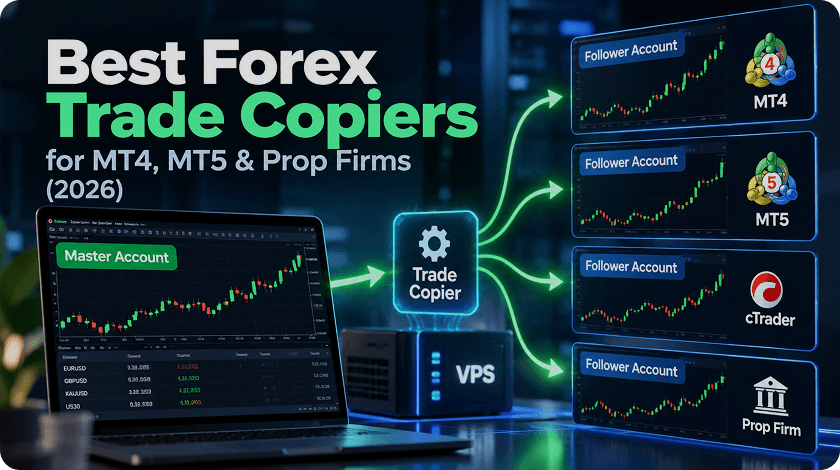
A Forex trade copier takes trades from a master account and replicates them to one or more follower accounts. Depending on the software, it can also adjust position size, translate broker symbols, copy between MT4 and MT5, apply account-specific risk settings, or even copy trades across completely different trading platforms.
But choosing the right copier is not simply a matter of finding the longest feature list.
The first question should be:
Do you need a local trade copier running your platforms together on a Windows PC or Forex VPS, or a cloud copier that handles the process through the provider’s own infrastructure?
That choice affects latency, platform compatibility, reliability, privacy, cost — and whether you need a VPS at all.
This guide compares the main Forex trade-copying options in 2026 and explains how to build the right setup around your brokers, platforms and trading strategy.
| Trade Copier | Type | Platforms | Best For | VPS? |
| FX Blue Personal Trade Copier | Local | MT4, MT5 | Free local copying | Recommended |
| Local Trade Copier | Local | MT4, MT5 | Multiple MetaTrader accounts | Recommended |
| Duplikium | Cloud | Multiple | Distributed accounts | Usually not required |
| Social Trader Tools | Cloud | MT4, MT5 | Cloud account management | Not required |
| TradersConnect | Cloud / Cross-platform | MT4, MT5, cTrader, TradeLocker & more | Cross-platform copying | Depends |
Quick answer: if all your accounts run on MT4/MT5 and you want control over the trading environment, a local copier running on a Forex VPS is often the simplest architecture. If your accounts are spread across several platforms or you don’t want to maintain trading terminals yourself, a cloud copier may make more sense.
A Forex trade copier is software that monitors activity on one master account and sends corresponding trading instructions to one or more follower accounts.
The basic architecture looks like this:
MASTER ACCOUNT
↓
TRADE COPIER
↓
FOLLOWER 1 · FOLLOWER 2 · FOLLOWER 3
The follower trade does not necessarily have to be identical to the master trade.
Depending on the copier, you may be able to configure:
This becomes important when the accounts are different sizes.
For example, copying a 1-lot EUR/USD trade from a $100,000 master account directly into a $10,000 follower account would create a very different level of exposure.
A useful copier therefore does more than reproduce an order. It needs to translate the master strategy into an appropriate follower-account instruction.
This is the most important distinction to understand before comparing individual products.
A local copier runs alongside the trading platforms themselves.
For example:
Windows Forex VPS
→ MT5 Master
→ Trade Copier
→ MT5 Follower #1
→ MT4 Follower #2
→ MT5 Follower #3
The terminals normally need to remain open on the same Windows machine.
This is why local copiers and Forex VPS hosting are commonly used together.
If you are planning a larger setup, read our guide to running multiple MT4/MT5 accounts before choosing your VPS resources.
A cloud copier moves the copying logic to infrastructure operated by the copier provider.
The architecture becomes more like:
MASTER BROKER
↓
COPIER CLOUD
↓
FOLLOWER BROKERS
You may therefore not need to keep several MetaTrader terminals running on your own server.
Neither architecture is automatically faster in every situation.
For a local copier:
Master terminal → Copier → Follower terminal
can happen within one server.
But the follower still needs to communicate with its broker:
Follower terminal → Network → Broker → Execution
The copier is therefore only one part of the total execution path.
FX Blue Personal Trade Copier is a strong starting point for traders who want local trade copying without a monthly copier subscription.
It supports:
FX Blue’s Personal Trade Copier is local. The sending and receiving MetaTrader installations need to run on the same computer.
That makes a practical always-on configuration:
MyForexVPS
→ MT5 Master
→ FX Blue
→ MT5 Follower #1
→ MT4 Follower #2
→ MT5 Follower #3
The terminals can remain online even when your personal computer is switched off.
If you haven’t built a multi-terminal environment before, follow our step-by-step guide on how to install multiple MT4 platforms on a Forex VPS.
MT4/MT5 traders looking for a free local copier and full control over the machine running their accounts.
Local Trade Copier takes the same general architecture further: several MetaTrader terminals running within one Windows environment with more extensive copying and risk-management controls.
This type of setup is particularly useful when a trader has:
Traders who want to centralise a larger number of MT4/MT5 accounts on one Windows VPS.
However, don’t size your server based purely on account count.
Five idle MetaTrader terminals are very different from five terminals each running several charts, indicators and computationally intensive EAs.
Our guide to MT4/MT5 VPS resource usage explains how CPU, RAM, charts and EAs affect the number of terminals a VPS can realistically support.
Duplikium takes a different approach.
Instead of requiring every MetaTrader terminal to run together on one Windows server, copying is handled through cloud infrastructure.
This can make more sense when accounts are spread across different brokers or environments and you don’t want to manage all the copying infrastructure yourself.
Cloud copier pricing is often tied to the number of connected accounts.
Local copier economics are different.
Adding another local account may mainly increase:
CPU + RAM + software requirements
while adding another cloud account may directly increase:
monthly subscription cost.
Neither model is inherently cheaper.
The right comparison is:
Total cost of running the complete setup at the number of accounts you actually use.
Traders who prefer cloud infrastructure over maintaining multiple local trading terminals.
Social Trader Tools combines trade copying with broader MetaTrader account-management functionality.
Unlike a local copier, the service is cloud-hosted.
That distinction is important because you do not automatically need a VPS just because you use a trade copier.
If the copier provider hosts the complete copying process itself, adding another VPS solely for the copier may solve no actual infrastructure problem.
Traders who want hosted MT4/MT5 account management without maintaining multiple terminals themselves.
Trading is no longer an MT4/MT5-only ecosystem.
A trader might now have:
This is where cross-platform copier services become much more relevant.
Instead of asking:
“What’s the best MT5 copier?”
the real question becomes:
“How do I get the same strategy from MT5 into accounts running on completely different platforms?”
TradersConnect is one example of this newer category, supporting a broader range of trading environments.
Traders managing accounts across several platform ecosystems rather than simply duplicating trades between MetaTrader terminals.
You can see the broader range of trading software compatible with our infrastructure in Brokers & Trading Platforms.
If your accounts use both versions of MetaTrader, cross-version support becomes important.
A copier may need to handle:
MT4 → MT5
or:
MT5 → MT4
But don’t choose your main trading platform solely around the copier.
MT4 and MT5 have different architectures, automation environments and strategy-testing capabilities. If you’re deciding which platform should host your master strategy, read our full MT4 vs MT5 comparison for 2026.
For existing legacy EAs, MT4 remains widely used.
For newer algorithmic strategies, MT5 offers a more modern architecture and more advanced testing capabilities.
Not always.
The correct answer depends on where the copier and trading software actually run.
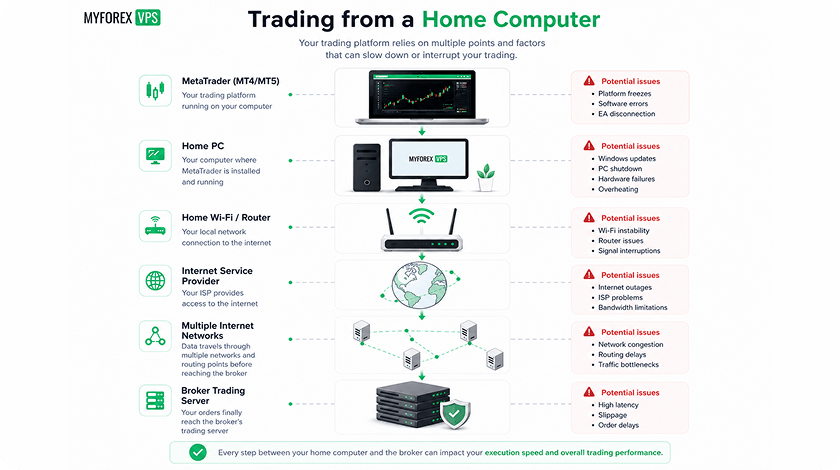
If the copier requires MT4/MT5 terminals to remain open, the computer hosting them becomes part of your trading infrastructure.
A Forex VPS lets that environment operate independently of:
Consider this setup:
EA
↓
Master MT5
↓
Local Copier
↓
5 Follower Terminals
The server is now responsible for:
That is an infrastructure workload, not simply “one MetaTrader account.”
The more terminals you add, the more important resource management becomes.
If you’re already experiencing slowdowns, read Running Multiple MT4/MT5 Accounts: The Performance Problem Most Traders Don’t Notice.
If your copier is completely cloud-hosted and doesn’t require trading terminals to remain running on your machine, a separate VPS may not be necessary.
That’s why:
“Every trade copier needs a VPS” is incorrect.
A better rule is:
Use a VPS when part of your trading workflow needs an always-on Windows environment.
That might be:
If everything is genuinely handled by the copier provider’s cloud, don’t add infrastructure just because somebody told you Forex traders “need a VPS.”
It can improve part of the path — but this claim is frequently oversimplified.
Consider a local copier:
Master MT5
↓
Copier
↓
Follower MT5
↓
Network
↓
Broker Server
↓
Execution
Moving the terminals from a home PC to infrastructure closer to the broker can shorten the network portion of that path.
But:
Ping is not the same as trade execution time.
Total execution can include:
A 2 ms ping therefore does not mean that a trade will necessarily be completely executed in 2 ms.
For a deeper explanation and real broker latency data, see MyForexVPS Forex Broker Latency.
“Copy speed” is not a single measurement.
There are at least three different delays involved.
How long passes between detecting the master trade and generating the follower instruction?
How long does data take to travel between the trading VPS and broker infrastructure?
What happens after the broker receives the order?
These are different things.
A meaningful test could record:
| Measurement | Result |
| Master trade timestamp | — |
| Follower instruction timestamp | — |
| Copier delay | X ms |
| VPS → broker ping | X ms |
| Follower acknowledgement | X ms |
| Total observed difference | X ms |
And the test should be repeated.
One successful trade is not a benchmark.
Average ping does not tell the whole story.
Compare:
4 ms → 5 ms → 4 ms → 6 ms → 5 ms
with:
2 ms → 3 ms → 48 ms → 2 ms → 71 ms
Connection B can advertise a lower minimum ping.
But would you necessarily call it the better trading connection?
The variation in latency is known as jitter.
For automated trading infrastructure, useful network measurements can therefore include:
This is particularly relevant for EAs and other strategies that send orders without a human sitting in front of the platform.
For local trade copying, your physical location isn’t necessarily the most important location.
Imagine:
You: Australia
Broker server: London
Putting the VPS in Australia simply because that’s where you live may create a long network route:
Australian VPS → London broker
A London VPS may provide a much shorter route:
London VPS → London broker
Your own connection to the VPS mainly affects how responsive remote access feels.
The VPS → broker connection is the path used by the trading terminal to communicate with the broker.
This is why Forex infrastructure discussions frequently include data-center ecosystems such as:
LD4 / LD8 — London
NY4 / NY11 — New York
SG1 / SG4 — Singapore
MyForexVPS currently provides trading VPS infrastructure across London, New York, Amsterdam and Singapore.
Don’t guess which one you need.
Check your broker latency before selecting a VPS location.
There is no reliable universal number.
That’s because:
10 idle terminals ≠ 10 terminals running complex EAs
The workload depends on:
MyForexVPS currently sizes its plans around practical MT4/MT5 workloads, with different configurations intended for different numbers of terminals.
For a more detailed explanation, see How Many MT4/MT5 Terminals Can You Run on a VPS?.
And if you run several MT4 instances on a multi-core VPS, our guide to setting CPU affinity in MetaTrader 4 explains one way of managing CPU allocation across terminals.
Technical compatibility is not the same as permission.
A copier may be technically capable of connecting two accounts while the prop firm’s rules prohibit that particular setup.
Rules can differ regarding:
So:
“Works with prop firms” should never be interpreted as “permitted by every prop firm.”
Before connecting an account, check the current rules for the specific firm and program.
This is especially important because prop-firm policies can change.
Check whether the follower uses:
Do not assume two accounts should receive identical lot sizes.
Broker symbols can differ.
For example:
EURUSD
EURUSD.a
EURUSDpro
Your copier therefore needs symbol mapping or automatic translation.
If you’re using a local copier, that’s expected.
The copier and terminals exist on the laptop. Turn off the machine and you turn off the trading environment.
An always-on VPS removes that dependency.
If you’re new to VPS trading, start with What Is a Forex VPS? The Complete Guide.
Check the whole route:
Copier → Follower Terminal → Network → Broker
Don’t diagnose every execution issue as a copier issue.
Use the Forex Broker Latency Checker from the server where the follower terminal actually runs.
Open Task Manager and inspect:
Adding RAM won’t necessarily solve a CPU bottleneck.
Likewise, adding CPU resources won’t fix a terminal that is consuming excessive memory.
Our multiple MT4/MT5 performance guide covers these bottlenecks in more detail.
Instead of starting with the software brand, answer these six questions.
Only MT4/MT5?
A local MetaTrader copier may be enough.
MT5 + cTrader + TradeLocker?
Look at cross-platform options.
Explore the brokers and trading platforms supported by MyForexVPS if you’re planning a mixed-platform VPS environment.
If prop firms are involved, check their current rules first.
Want control over the Windows environment?
Local copier + VPS.
Don’t want to maintain terminals?
Cloud copier.
Calculate the full cost.
For local copying:
copier licence + VPS + required resources
For cloud:
subscription × connected accounts + additional services
For local setups, this is critical.
Use actual latency measurements rather than choosing a VPS location because it happens to be geographically close to you.
Before going live, know:
These questions matter considerably more than a marketing claim promising “instant copying.”
A typical local setup could look like:
MYFOREXVPS WINDOWS SERVER
↓
MT5 MASTER
EA / Manual Strategy
↓
LOCAL TRADE COPIER
↓
MT5 FOLLOWER — Broker A
MT4 FOLLOWER — Broker B
MT5 FOLLOWER — Prop Account
↓
BROKER INFRASTRUCTURE
This architecture keeps:
inside one continuously running Windows environment.
You can access the VPS remotely when required without leaving your personal computer running.
MyForexVPS supports MT4, MT5 and other Windows-based trading platforms, multiple terminals, EAs and any broker.
Choose based primarily on your broker infrastructure, not your home address.
Consider London when your relevant broker servers are hosted within or close to the London financial infrastructure ecosystem.
Consider New York for brokers with trading infrastructure in the New York/New Jersey area.
For Asia-Pacific broker infrastructure, explore our Singapore Forex VPS, built around the SG1 Singapore location.
Amsterdam can provide a strong route to broker infrastructure hosted in continental Europe.
If you’re unsure:
Don’t choose yet.
First check your broker latency from the available locations.
There isn’t one Forex trade copier that is right for every trader.
Start with the architecture.
Then compare products within the category that actually fits your setup.
A free local copier running on a well-configured VPS can make more sense than an expensive cloud service for three MT5 accounts.
A cloud copier can make more sense than maintaining ten local terminals if your accounts are distributed across several trading platforms.
The best trade copier is therefore not necessarily the product with the most features.
It is the one that adds the least unnecessary complexity between your strategy and the accounts that need to execute it.
No comments yet
Be the first to share your experience!
Your review has been received and will be published after moderation.

It depends on your setup. FX Blue is a strong free option for local MT4/MT5 copying, while cloud and cross-platform services can be better suited to accounts distributed across different brokers, machines or trading platforms.
Yes. Some trade copiers support MT4 → MT5 and MT5 → MT4 copying. If you’re deciding which platform should be your primary trading environment, read our MT4 vs MT5 comparison.
Yes, with compatible copier software. However, symbol names, contract specifications, spreads, prices and execution can differ, so follower results may not exactly match the master account.
Not always. Local copiers benefit from an always-on PC or VPS because the trading terminals must remain running. Fully cloud-hosted copiers may not require your own VPS.
Yes, provided every required component remains online. For a local copier, that normally means keeping the Windows machine, trading platforms and copier running continuously.
Potentially, but technical compatibility does not mean the setup is permitted. Check the current rules of the specific prop firm and account program before copying
To provide the best experiences, we and our partners use technologies like cookies to store and/or access device information. Consenting to these technologies will allow us and our partners to process personal data such as browsing behavior or unique IDs on this site and show (non-) personalized ads. Not consenting or withdrawing consent, may adversely affect certain features and functions.
Click below to consent to the above or make granular choices. Your choices will be applied to this site only. You can change your settings at any time, including withdrawing your consent, by using the toggles on the Cookie Policy, or by clicking on the manage consent button at the bottom of the screen.