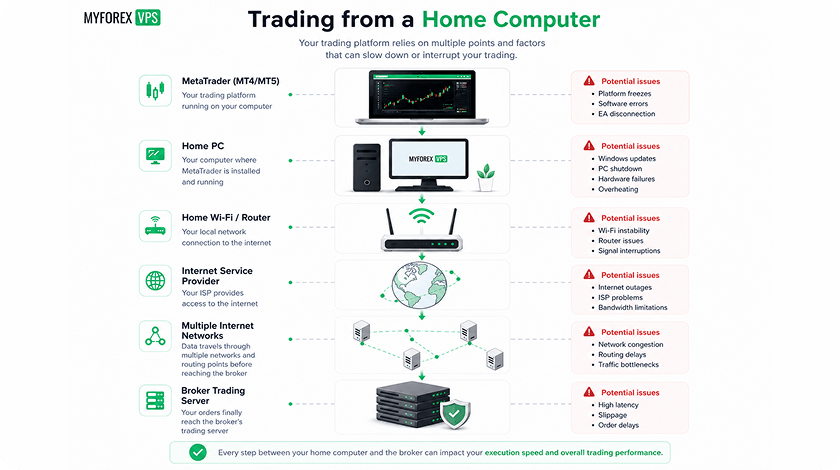
When traders compare MT4 VPS plans, RAM is usually the first number they notice.
2 GB, 4 GB, 8 GB, 16 GB—the larger number appears to offer better performance. VPS providers know this, which is why memory is often one of the most visible specifications on a pricing page.
For MetaTrader 4, however, more RAM does not automatically mean a faster trading environment.
RAM determines how much data and how many applications the server can keep in memory. CPU performance determines how quickly the system can execute calculations. Those are different jobs, and confusing them can lead traders to pay for resources they do not actually need.
If your VPS has insufficient memory, RAM is absolutely the priority. But once there is enough memory to run Windows, MT4 terminals, charts, indicators and Expert Advisors comfortably, adding more RAM may have little or no effect on performance.
At that point, CPU performance can become the limiting factor.
This matters most for automated trading. An MT4 terminal running complex Expert Advisors is not simply displaying charts. It is processing incoming price data, executing MQL4 code, calculating indicators and managing trading logic. If those calculations are CPU-bound, doubling the available RAM will not make them complete faster.
That is why a smaller VPS with strong, consistently available CPU resources can sometimes outperform a larger VPS with more RAM but weaker processor performance.
The important question is not simply how much memory a VPS has. It is whether the available CPU can handle your trading workload when the market becomes active.
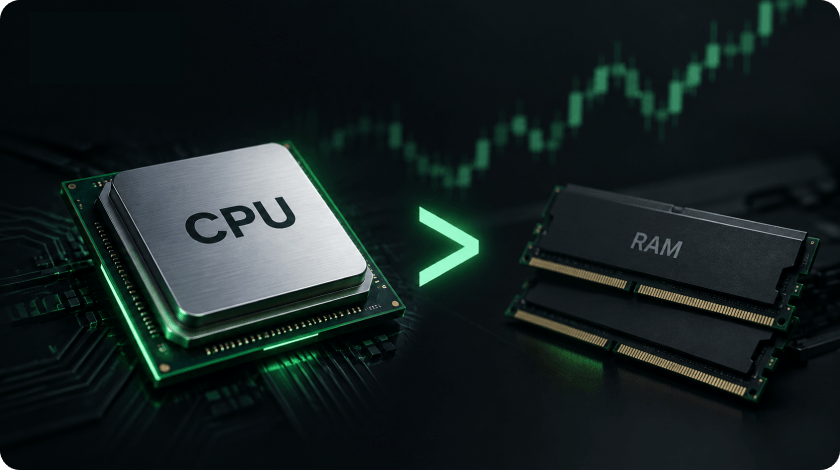
RAM Is Capacity. CPU Is Processing Power.
The easiest way to understand the difference is to think about RAM as workspace.
MetaTrader needs memory to store and manage:
- price history;
- chart data;
- indicator buffers;
- Expert Advisor data;
- application processes;
- operating system resources.
If there is not enough workspace, the system eventually runs into trouble. Applications may become slower, Windows may rely more heavily on virtual memory, and overall performance can deteriorate.
But additional workspace does not make the work itself happen faster.
Suppose your MT4 environment uses 3 GB of memory and your VPS has 8 GB available. You have sufficient RAM with significant headroom.
Upgrading to 16 GB does not automatically improve EA execution. Your MT4 terminal is not suddenly twice as fast because another 8 GB is sitting unused.
Now imagine that CPU usage reaches 90–100% during periods of heavy market activity. In that situation, the processor—not memory—is the bottleneck.
This distinction is fundamental when selecting a VPS for automated trading.
RAM solves a lack-of-capacity problem. CPU performance solves a processing-speed problem.
The correct upgrade depends on which resource is actually limiting the system.
What MT4 Is Doing When a Tick Arrives
A basic MT4 setup can be extremely light. A few charts with standard indicators may barely use the available CPU.
Automated trading changes the picture.
MetaTrader 4 uses an event-driven environment. According to MetaQuotes’ MQL4 documentation, Expert Advisors respond to events such as incoming ticks, timers and other terminal events. When a new tick arrives, an EA can execute whatever logic its developer has programmed. (docs.mql4.com)
For one strategy, that might mean checking whether a moving average has crossed another.
For another, it could involve analysing:
- multiple currency pairs;
- several timeframes;
- dozens of open positions;
- technical indicators;
- risk parameters;
- historical data;
- account-level conditions.
The difference in CPU requirements can be enormous.
This is why asking how many EAs a VPS can run is almost as misleading as asking how many charts it can handle. Five lightweight EAs may consume fewer resources than one poorly optimised algorithm.
The same applies to indicators. A simple moving average creates a very different workload from a custom indicator that repeatedly recalculates large amounts of historical data.
The CPU requirement is determined by what the software actually does—not by the number of windows visible on the screen.
Why CPU Frequency Matters
CPU frequency, usually expressed in GHz, represents how quickly a processor’s clock operates. It is not a complete measure of performance, but it remains relevant for workloads that depend heavily on individual CPU cores.
A faster clock does not guarantee that one processor will outperform another. CPU architecture, generation, cache, instructions per clock and virtualization all affect real-world performance.
A modern processor at 3.5 GHz may outperform an older processor running at 4 GHz.
Still, frequency matters when comparing broadly similar CPUs.
If an Expert Advisor is performing CPU-intensive calculations, stronger per-core performance means those calculations can generally be completed more quickly.
That becomes important because additional RAM does not accelerate CPU-bound code.
Imagine an EA that performs the following tasks whenever market conditions change:
- Retrieves new price information.
- Updates several indicators.
- Scans multiple instruments.
- Checks existing positions.
- Calculates risk.
- Evaluates entry conditions.
- Decides whether an order should be sent.
If this process takes longer because CPU resources are limited, increasing memory from 8 GB to 16 GB will not necessarily change anything.
The workload already fits in memory.
The limiting factor is how quickly the processor can execute it.
Single-Core Performance Can Matter More Than Core Count
VPS plans frequently advertise the number of vCPUs.
More cores are useful, particularly when you run multiple MT4 terminals or several independent workloads. The operating system can distribute work across the available processing resources.
But more cores do not automatically mean better MT4 performance.
MetaQuotes documents that Expert Advisors operate in separate threads, while indicators have different execution characteristics within the terminal environment. (docs.mql4.com)
The important point for traders is that individual calculations are not automatically accelerated just because a VPS advertises more virtual CPU cores.
A strategy with a computationally intensive workload may depend heavily on the performance available to the thread executing that workload.
Consider two VPS plans:
VPS A
- 8 GB RAM
- 8 vCPUs
- older or heavily shared processor resources
VPS B
- 4 GB RAM
- 4 vCPUs
- modern processor with stronger single-core performance
If your trading setup only requires 3 GB of RAM, VPS B may provide better real-world performance.
The first plan has more resources on paper. But resources that your MT4 setup does not need offer limited value.
This is particularly important because a vCPU is not necessarily equivalent to a dedicated physical processor core. VPS performance depends on the provider’s underlying infrastructure and resource allocation.
Eight heavily contended vCPUs are not automatically better than four consistently available high-performance cores.
Market Activity Can Expose a Weak CPU
A VPS can look perfectly healthy when the market is quiet.
CPU usage may remain low for hours. Charts update normally. Expert Advisors appear to be running without problems.
Then market activity increases.
During major economic announcements or periods of volatility, multiple symbols can receive a higher volume of price updates. Several EAs may execute their logic at the same time. Indicators can recalculate and trade copiers may process additional activity.
A CPU with limited headroom can suddenly become the bottleneck.
This is why traders should not evaluate VPS performance only by looking at average CPU usage.
What matters is how the server behaves during its busiest periods.
A VPS running at 15% CPU most of the day but repeatedly reaching 100% when several EAs become active may be undersized for the actual trading workload.
Adding more RAM would not necessarily solve that problem.
A faster processor, more available CPU capacity or better optimisation of the trading software may be required instead.
When RAM Matters More Than CPU
There is one important qualification: CPU frequency is not always more important than RAM.
If your VPS does not have enough memory, RAM is the problem.
For example, suppose Windows and your complete trading environment require 6 GB of memory.
A 4 GB VPS is insufficient.
In that case, choosing a faster CPU while keeping the same 4 GB allocation is unlikely to solve the underlying issue. The system needs more memory.
The same applies to traders running:
- many MT4 terminals;
- deep historical datasets;
- multiple custom indicators;
- trade copiers;
- other applications alongside MetaTrader.
MetaQuotes’ documentation notes that historical data and indicator buffers consume memory and that the number of bars available to charts and MQL4 programs can affect resource usage. (docs.mql4.com)
The sensible approach is therefore sequential.
First, ensure that the VPS has enough RAM for the full environment.
Then ask whether CPU performance is limiting what happens next.
For many MT4 setups, this is the point where CPU becomes more important.
Poorly Optimised EAs Can Create CPU Problems
Hardware is not always the answer.
A badly written Expert Advisor can consume unnecessary CPU resources regardless of how much RAM the VPS has.
Common examples include code that:
- repeatedly scans large datasets;
- recalculates indicators unnecessarily;
- performs expensive operations on every tick;
- processes symbols that are not relevant to the strategy;
- creates excessive logging or chart objects.
Two traders can run the same number of MT4 terminals on identical VPS plans and experience completely different resource usage simply because their EAs are programmed differently.
Before upgrading a VPS, it is worth identifying which process is actually consuming the CPU.
If one EA is responsible for most of the load, a larger VPS may help, but optimisation could be a more effective long-term solution.
More hardware should not be used as a substitute for efficient software.
How to Identify the Real Bottleneck
The simplest starting point is Windows Task Manager.
Run your normal MT4 environment with all required terminals, EAs and indicators active. Then monitor both CPU and memory usage.
Do not test only when markets are quiet.
If possible, observe the VPS during periods when your strategies normally experience the highest activity.
Look for patterns.
If memory usage remains comfortably below the available limit while CPU repeatedly reaches high levels, your problem is probably processing capacity.
If CPU usage is moderate but memory is consistently close to full, additional RAM may be the more appropriate upgrade.
Also pay attention to individual processes.
One MT4 terminal consuming most of the CPU may indicate a particularly demanding EA or indicator. Adding another 8 GB of memory will not fix a process that is already CPU-bound.
The goal is not simply to choose the largest VPS plan.
It is to identify the resource that is actually under pressure.
CPU Performance Is Not the Same as Trading Latency
A faster CPU does not automatically mean faster order execution.
Trading performance involves two separate elements.
The first is processing.
Your VPS needs enough CPU performance to run the terminal and execute your strategy efficiently.
The second is network latency.
Once MT4 decides to send an order, that instruction still has to travel from the VPS to the broker’s trading infrastructure.
A high-frequency CPU in a distant location can still have worse network latency than a slightly less powerful VPS located close to the broker.
For this reason, the ideal trading VPS balances both factors.
You want enough CPU capacity to process the trading strategy without unnecessary delays and a server location that provides low, stable latency to the broker.
More RAM does not solve either problem if you already have enough memory.
What Traders Should Look for in an MT4 VPS
Instead of comparing VPS plans primarily by RAM, evaluate the complete configuration.
Start with memory. Make sure there is enough RAM for Windows and your actual MT4 workload, with room for temporary spikes.
Then examine CPU performance.
Where possible, look beyond the number of advertised vCPUs. Consider the processor generation, expected clock speed, single-core performance and whether CPU resources are consistently available.
Resource allocation also matters. A VPS with fewer but reliably available CPU resources can be preferable to a larger plan where performance varies because the underlying server is heavily shared.
Finally, choose a location appropriate for your broker.
The best specification in the wrong location may not be the best trading VPS.
The Bottom Line
RAM is essential for MetaTrader 4—but more RAM does not automatically make MT4 faster.
If your trading environment is running out of memory, upgrade the memory. That is straightforward.
But once you have enough RAM to run your terminals, charts, indicators and Expert Advisors comfortably, additional memory can provide diminishing returns.
For automated trading, CPU performance often becomes the next constraint.
This is particularly true for strategies that process frequent ticks, perform complex calculations or run across multiple symbols and timeframes.
CPU frequency alone is not enough to judge a VPS. Processor architecture, single-core performance, number of cores and resource allocation all matter.
But the core principle remains simple:
Once MT4 has enough memory, the speed at which your VPS can process trading logic may matter far more than how much unused RAM is sitting on the server.
The right VPS is not the one with the biggest RAM number.
It is the one with enough memory for your workload, enough CPU performance for your strategy and enough headroom to remain stable when the market is at its busiest.