Whether you trade manually, run Expert Advisors, or manage multiple MT4 and MT5 accounts, a Forex VPS provides a stable trading environment that operates independently of your home computer. Instead of relying on residential internet, local hardware, and unpredictable power outages, your trading platform runs continuously in a professional data center designed for high availability and low network latency.
This guide explains how Forex VPS hosting works, when it makes sense to use one, how much latency actually matters, how to choose the right configuration, and what separates a good trading VPS from an ordinary cloud server.
What Is a Forex VPS?
Every trader eventually discovers that market risk is only part of the equation. The other part is infrastructure.
A profitable strategy can fail for reasons that have nothing to do with market direction. A power outage, unstable Wi-Fi connection, Windows updates, an overloaded laptop, or a temporary internet interruption can all disconnect a trading platform at the worst possible moment. For traders running automated strategies, Expert Advisors, or copy trading systems, even a brief interruption may prevent orders from being executed or stop an algorithm from reacting to changing market conditions.
A Forex VPS (Virtual Private Server) is designed to remove these infrastructure-related risks by moving your trading platform from your personal computer to a professionally managed data centre.
Unlike a home computer, which depends on residential internet and local hardware, a Forex VPS operates inside enterprise infrastructure built for continuous availability. The server remains online regardless of whether your laptop is switched off, your home internet fails, or your operating system restarts. As long as the VPS itself is running, your trading platform continues processing market data, monitoring positions, and executing trading rules.
In practical terms, a Forex VPS functions as a dedicated Windows desktop that you access remotely. After connecting through Microsoft Remote Desktop or another secure client, you can install MetaTrader 4 (MT4), MetaTrader 5 (MT5), cTrader, NinjaTrader, TradingView Desktop, or any other Windows-based trading application exactly as you would on your own PC. Once configured, the platform continues running independently of your local device.
The primary purpose of a Forex VPS is reliability rather than additional computing power. Most retail trading platforms require relatively modest hardware resources. What matters far more is maintaining a stable operating environment that minimizes interruptions during active market hours.
Another important advantage is network proximity. Many Forex VPS providers host servers in financial hubs such as London, New York, Frankfurt, Amsterdam, Singapore, or Tokyo, allowing trading platforms to communicate with broker infrastructure through shorter network paths than a typical residential internet connection. While a VPS cannot eliminate slippage during volatile market conditions or improve a trading strategy, reducing unnecessary network delay can contribute to more consistent order transmission, particularly for latency-sensitive trading styles such as scalping or automated execution.
Forex VPS solutions are widely used by:
- traders running Expert Advisors (EAs);
- algorithmic and quantitative traders;
- high-frequency and scalping strategies;
- traders operating multiple MT4 or MT5 terminals;
- copy trading providers;
- signal services that require continuous connectivity.
For discretionary traders who manually execute only a few trades each week, a VPS may simply provide convenience and remote access. For automated systems that monitor the market continuously, however, it often becomes part of the trading infrastructure rather than an optional accessory.
It is equally important to understand what a Forex VPS does not do. A VPS does not improve a trading strategy, predict market direction, reduce spreads, or guarantee profitable execution. Successful trading still depends on the quality of the strategy, broker execution, risk management, and market conditions. The VPS simply provides a stable technical environment that allows those components to operate without being interrupted by local hardware or connectivity issues.
Home Computer vs Forex VPS
One of the easiest ways to understand the difference is to compare where your trading platform actually runs.
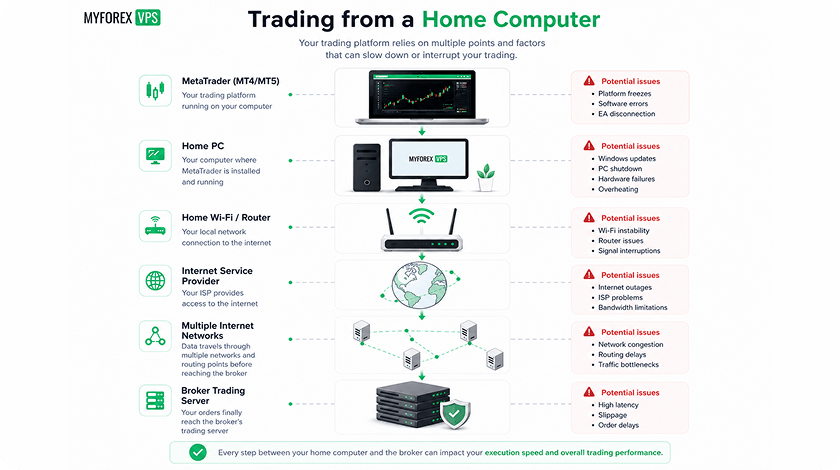
Potential points of failure:
- Internet outages
- Power cuts
- Windows updates
- Laptop shutdown
- Hardware failures
- Wi-Fi instability
Trading on a Forex VPS
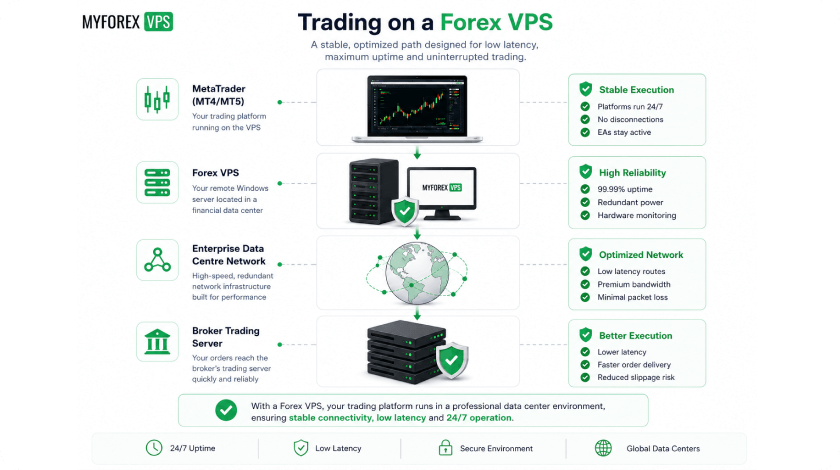
With this setup, your trading platform remains online even if your personal computer is switched off. You simply reconnect to the VPS whenever you need to monitor positions or make changes.
Forex VPS vs a Regular Cloud Server
Although every Forex VPS is technically a virtual private server, not every VPS is suitable for trading.
A standard cloud server may be designed for hosting websites, applications, or databases, where occasional variations in latency or performance have little impact on the workload. A Forex VPS, by contrast, is typically configured with trading-specific requirements in mind.
The main differences often include:
| Standard VPS |
Forex VPS |
| General-purpose hosting |
Optimised for trading platforms |
| Data centres chosen for availability |
Locations selected near major financial hubs |
| Basic performance expectations |
Stable network latency and continuous operation |
| General technical support |
Teams familiar with MT4, MT5 and trading software |
| Mixed workloads |
Designed for long-running trading applications |
This distinction explains why two VPS plans with identical hardware specifications may deliver very different experiences for active traders.
How Does a Forex VPS Work?
Although a Forex VPS may sound like complex infrastructure, the concept is surprisingly straightforward.
Instead of running your trading platform on your personal computer, you install it on a virtual Windows server hosted in a professional data centre. You then connect to that server remotely, just as you would connect to another computer in your office.
Once configured, the VPS continues running independently of your local device. Your laptop becomes nothing more than a remote control, while the actual trading platform remains online inside the data centre.
This means your trading platform continues to receive live market data, monitor open positions and execute trading rules even when your home computer is switched off.
The entire process can usually be completed in less than 30 minutes.
Step 1 — Choose a VPS Location
The physical location of your VPS is more important than many traders realise.
Every order placed through MetaTrader or another trading platform must travel across the internet before reaching your broker’s trading server. The greater the distance, the more network devices the order passes through and the longer it may take to arrive.
Whenever possible, choose a VPS located close to your broker’s execution servers.
For example:
| Broker Location |
Recommended VPS |
| London (LD4) |
London |
| New York (NY4) |
New York |
| Frankfurt |
Frankfurt |
| Singapore |
Singapore |
| Tokyo |
Tokyo |
Reducing the physical distance between your VPS and the broker generally reduces network latency and creates a more direct communication path.
Step 2 — Connect Through Remote Desktop
After your VPS is deployed, your hosting provider supplies a public IP address together with secure login credentials.
Using Microsoft Remote Desktop (RDP), you connect to the VPS exactly as if you were sitting in front of another Windows computer.
From your perspective, nothing feels different—you have a familiar Windows desktop where applications can be installed, files managed and trading platforms launched.
Unlike cloud-based trading terminals, a VPS gives you full control over the operating system and installed software.
Step 3 — Install Your Trading Platform
Once connected, install the software you normally use for trading.
Most traders run one or more of the following platforms:
- MetaTrader 4 (MT4)
- MetaTrader 5 (MT5)
- cTrader
- NinjaTrader
- TradingView Desktop
- Broker-specific trading applications
The installation process is identical to installing software on a personal computer.
If you already have templates, indicators or configuration files, they can simply be copied to the VPS.
Step 4 — Configure Your Trading Environment
Next, customise the VPS to match your existing trading workflow.
Typical components include:
- Expert Advisors (EAs)
- Custom indicators
- Trading scripts
- Risk management tools
- Chart templates
- DLL libraries (where applicable)
- Trading journals
- Notification services
At this stage, the VPS effectively becomes your primary trading workstation, even though you access it remotely.
Step 5 — Launch Your Trading Platform
Open your trading platform and verify that everything is operating correctly before leaving the VPS unattended.
A good pre-launch checklist includes:
✓ Trading account connected
✓ Market Watch updating
✓ Expert Advisors enabled
✓ AutoTrading activated
✓ Charts loading correctly
✓ VPS system clock synchronized
✓ No Windows restart pending
Taking a few minutes to verify the setup helps avoid unexpected interruptions later.
Step 6 — Disconnect Without Stopping Your Trading
This is one of the most common misconceptions among traders who are new to VPS hosting.
Closing the Remote Desktop session does not close MetaTrader, cTrader or any other software running on the VPS.
Think of Remote Desktop as a window into another computer.
Closing the window simply disconnects your view—it does not switch off the computer itself.
As long as the VPS remains powered on, your trading platform continues to:
- receive live price feeds;
- monitor market conditions;
- manage open positions;
- execute Expert Advisors;
- trigger stop-loss and take-profit logic;
- generate alerts and notifications.
This allows automated trading systems to operate continuously, regardless of whether your own computer is online.
How the Trading Process Works
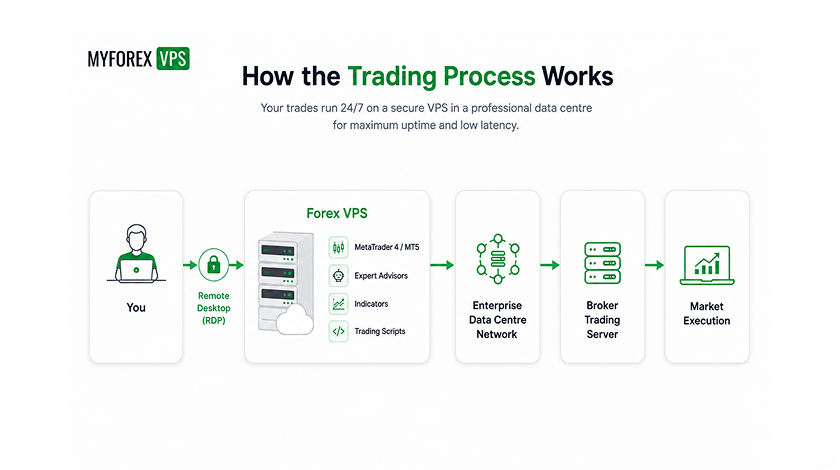
Unlike a home computer, where the trading platform depends on local hardware and internet connectivity, the VPS remains continuously connected to the broker through enterprise-grade infrastructure.
Does a Forex VPS Make Trading Better?
A common misconception is that using a Forex VPS automatically improves trading performance.
It does not.
A VPS cannot predict market movements, improve an ineffective strategy or guarantee profitable trades.
Its purpose is to create a more reliable execution environment by reducing the likelihood that local technical issues interfere with your trading.
In other words:
- Your strategy determines whether you make money.
- Your broker determines how orders are executed.
- Your Forex VPS helps ensure those orders can be sent consistently, even if your own computer or internet connection fails.
For traders relying on Expert Advisors, algorithmic strategies or multiple trading accounts, that reliability often becomes just as important as the strategy itself.
Who Actually Needs a Forex VPS?
Not every trader requires a Forex VPS. The benefits largely depend on your trading style, the amount of automation you use, and how critical uninterrupted connectivity is to your strategy.
For some traders, a VPS is simply a convenient way to access their trading platform remotely. For others—particularly those running automated strategies—it becomes an essential part of their trading infrastructure.
The table below provides a quick overview, followed by a detailed explanation of why a VPS may or may not be necessary for each trading style.
| Trading Style |
VPS Required? |
Why |
| Swing Trading |
Optional |
Positions remain open for days or weeks, making short interruptions less critical. |
| Day Trading |
Recommended |
Stable connectivity reduces the risk of interruptions during active trading sessions. |
| Scalping |
Highly Recommended |
Fast execution and consistent connectivity are especially important when targeting small price movements. |
| Expert Advisors (EAs) |
Essential |
Automated strategies must remain online continuously to monitor the market and execute trading rules. |
| Copy Trading |
Recommended |
Ensures signal processing continues even when your local computer is offline. |
| Multiple MT4/MT5 Accounts |
Essential |
Running several terminals simultaneously benefits from dedicated hardware and continuous availability. |
Swing Traders
Swing traders typically hold positions for several days or even weeks, making them less sensitive to short-term technical interruptions.
If your strategy involves analysing the market once or twice a day and manually placing trades with relatively wide stop-loss and take-profit levels, a Forex VPS is unlikely to have a significant impact on trading results.
However, a VPS may still offer valuable convenience. It allows you to monitor positions remotely, keeps your trading platform synchronised at all times, and removes concerns about leaving your personal computer running continuously.
For swing traders, a VPS is generally a matter of convenience rather than necessity.
Day Traders
Day traders usually open and close positions within a single trading session, often reacting to rapidly changing market conditions.
Unlike swing traders, they spend extended periods connected to the market and may rely on constant chart updates, price alerts and uninterrupted platform access.
Although a VPS cannot improve decision-making or predict price direction, it reduces the likelihood that internet outages, Windows updates or hardware failures interrupt trading during active market hours.
For traders executing multiple manual trades each day, this additional reliability can provide greater confidence that the trading platform remains available whenever market opportunities appear.
Scalpers
Scalping places some of the highest demands on trading infrastructure.
Scalpers often target price movements of only a few pips while executing a large number of trades throughout the day. In this environment, consistent connectivity becomes increasingly important because delays in order transmission may have a greater impact than they would for longer-term trading strategies.
Using a VPS hosted near the broker’s infrastructure may help reduce network latency compared with a residential internet connection, particularly when the trader is located far from the broker’s execution servers.
It’s important to understand that lower latency does not guarantee better fills or eliminate slippage during volatile market conditions. Broker execution quality, market liquidity and order-routing mechanisms remain equally important factors.
For serious scalpers, however, a stable, low-latency environment is generally considered part of the overall trading infrastructure.
Traders Using Expert Advisors (EAs)
This is where a Forex VPS becomes genuinely important.
Expert Advisors continuously monitor market conditions, analyse price movements and execute trades according to predefined rules. They cannot perform these tasks if the trading platform is offline.
Running an EA on a home computer means the strategy immediately stops whenever:
- the computer is switched off;
- Windows installs updates and restarts;
- the internet connection is interrupted;
- the trading platform crashes;
- electrical power is lost.
A VPS eliminates most of these local risks by allowing the trading platform to operate inside a professional data centre designed for continuous operation.
For traders relying on automation, a VPS is not simply an upgrade—it becomes part of the infrastructure required to keep the strategy running as intended.
Copy Trading
Modern copy trading systems automatically replicate trades from a signal provider to the follower’s account.
While many cloud-based copy trading services operate independently of the trader’s computer, local trade copiers and MT4/MT5 synchronisation tools often require both trading terminals to remain connected.
Hosting these platforms on a VPS ensures they continue exchanging trading signals even if your personal computer is offline.
This makes VPS hosting particularly useful for traders managing multiple investor accounts or operating private copy-trading networks.
Traders Running Multiple Trading Accounts
Many professional traders simultaneously operate several MetaTrader terminals.
Examples include:
- managing client accounts;
- testing multiple Expert Advisors;
- separating manual and automated strategies;
- trading different brokers simultaneously;
- portfolio diversification.
Running several MT4 or MT5 instances on a personal laptop quickly consumes CPU resources and available memory.
A VPS with dedicated processing power and sufficient RAM provides a more stable environment for handling multiple trading platforms over long periods without affecting the performance of your everyday computer.
Who Benefits the Most?
The greatest value from a Forex VPS is typically seen by traders who:
- rely on automation;
- need continuous platform availability;
- operate several trading terminals;
- require remote access from different locations;
- want to minimise the impact of local hardware or internet failures.
If your trading activity depends on your platform remaining online around the clock, a VPS should be viewed as part of your trading infrastructure rather than an optional convenience.
Benefits of a Forex VPS
Many traders associate Forex VPS hosting with one advantage—lower latency. While latency is certainly important, it represents only one part of the overall value.
A professionally managed VPS improves reliability, operational continuity, flexibility and system stability across the entire trading environment.
24/7 Uptime
Retail traders often underestimate how many events can interrupt a trading platform.
A laptop battery may discharge overnight, Windows can install updates unexpectedly, internet service providers occasionally experience outages, and power failures can occur without warning.
A Forex VPS moves the trading platform into a professional data centre equipped with redundant power supplies, backup networking equipment and continuously monitored hardware.
Instead of depending on the reliability of a single home computer, your trading environment operates inside infrastructure designed for continuous availability.
For automated trading systems, this means strategies can continue monitoring the market and executing trading logic regardless of whether your local device is online.
Lower Latency
Every trade submitted through MT4, MT5 or another trading platform travels across multiple network devices before reaching the broker’s execution servers.
The longer this route becomes, the greater the communication delay may be.
Hosting your VPS close to your broker’s infrastructure reduces the physical distance that market data and trading orders need to travel.
Although latency is only one factor influencing execution quality, shorter network paths generally contribute to more consistent communication between the trading platform and the broker.
This is particularly relevant for:
- Expert Advisors;
- scalping strategies;
- high-frequency execution;
- news trading;
- arbitrage systems.
More Reliable Order Execution
A Forex VPS cannot improve broker execution, tighten spreads or eliminate slippage.
However, it can reduce one important source of execution problems: interruptions originating from the trader’s own environment.
If an order is delayed because your home internet disconnects or your computer freezes, the broker never has the opportunity to process it immediately.
By reducing the likelihood of local connectivity failures, a VPS helps create a more stable path between your trading platform and the broker’s infrastructure.
Stable Expert Advisors
Automated strategies are designed to react instantly to predefined market conditions.
If the platform stops running—even for a few minutes—the algorithm may miss trading opportunities or fail to manage existing positions.
Hosting Expert Advisors on a VPS provides a dedicated environment where they can continue analysing market data, monitoring positions and executing trading logic continuously without depending on your personal computer.
For traders running automated systems, stability is often more valuable than additional processing power.
Access Your Trading Platform from Anywhere
One practical advantage of VPS hosting is flexibility.
Because the trading platform runs remotely, you can connect securely from almost any device with an internet connection.
Whether using a desktop computer in the office, a laptop while travelling or a tablet during a business trip, your VPS provides access to the same trading environment without requiring files or software to be transferred between devices.
This also simplifies maintenance, as updates, templates and Expert Advisors remain stored in one central location.
Enhanced Security
A professionally managed VPS can also improve the security of your trading environment.
Instead of exposing your trading platform to a personal computer used for everyday browsing, gaming or downloading software, the VPS can be dedicated exclusively to trading applications.
Additional security features often include:
- encrypted Remote Desktop connections;
- configurable firewalls;
- regular operating system updates;
- automated backups (depending on the provider);
- user access management;
- data centre physical security.
While no system can eliminate cybersecurity risks completely, separating trading activities from everyday computer usage reduces the attack surface and creates a cleaner, more controlled operating environment.
Is a Forex VPS Worth It?
The answer depends less on your experience level and more on how you trade.
If you place a few manual trades each month, the practical benefits may be limited.
If your trading relies on Expert Advisors, multiple platforms, copy trading or uninterrupted market access, a Forex VPS is no longer simply a hosting service—it becomes an important component of a reliable trading infrastructure.
Why Latency Matters
Latency is one of the most misunderstood concepts in retail trading.
Many traders believe that buying a Forex VPS automatically results in faster execution, more profitable trades, or lower slippage. The reality is far more nuanced.
Latency is only one component of a much larger execution chain that begins when you click the Buy or Sell button and ends when your broker confirms the order.
Understanding this process helps traders make better infrastructure decisions and avoid unrealistic expectations.
What Is Latency?
Latency is the amount of time required for information to travel between two points on a network.
In Forex trading, this usually refers to the time it takes for your trading platform to communicate with your broker’s trading server.
Latency is typically measured in milliseconds (ms).
For perspective:
- 1 millisecond = 0.001 seconds
- 10 milliseconds = 0.01 seconds
- 100 milliseconds = 0.1 seconds
Although these numbers appear extremely small, thousands of market updates occur every second during active trading sessions.
What Happens When You Place an Order?
Every order follows approximately the same journey.
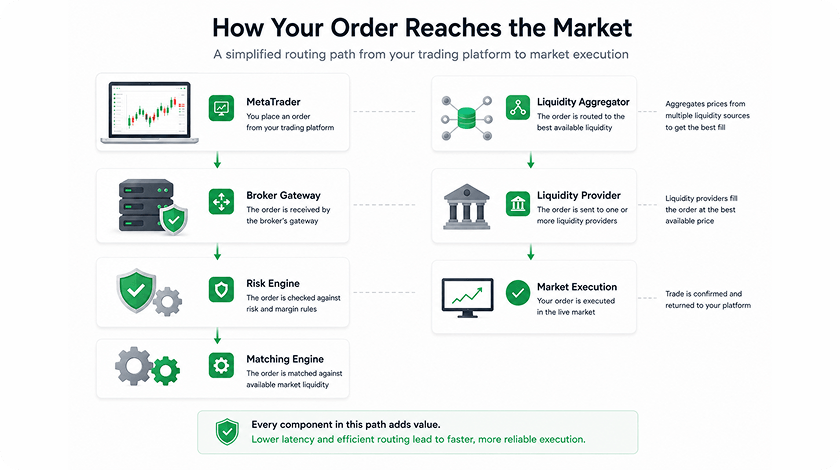
The total execution time depends on every component in this chain—not simply on the VPS.
Understanding the Different Types of Delay
Many traders incorrectly assume that latency is one single number.
In reality, several different delays contribute to overall execution time.
Network Latency
The time required for data packets to travel between your trading platform and the broker.
This is the delay that a Forex VPS primarily helps reduce.
Platform Processing Time
Before an order leaves your computer or VPS, MetaTrader processes:
- Expert Advisors
- scripts
- indicators
- order validation
- account verification
Running dozens of Expert Advisors on an overloaded system can increase processing time before the order even reaches the network.
Broker Processing Time
After the broker receives your order, it must:
- validate account balance
- verify margin requirements
- perform risk checks
- determine execution method
- route the order
This processing time varies between brokers and account types.
Liquidity Provider Execution
For ECN and STP brokers, orders are typically forwarded to one or more liquidity providers.
Execution speed at this stage depends on:
- available market liquidity
- order size
- market volatility
- pricing updates
- matching engine performance
A VPS has no influence over this part of the process.
Ping vs Execution Speed
One of the most common misconceptions is confusing ping with execution speed.
Ping measures how quickly your computer receives a response from another server.
Execution speed measures how long it takes the broker to receive, validate, route and complete an order.
For example:
| Metric |
Typical Value |
| Ping |
2 ms |
| Broker validation |
6 ms |
| Risk checks |
3 ms |
| Liquidity routing |
5 ms |
| Final execution |
4 ms |
Total execution time = 20 ms
Reducing ping from 4 ms to 1 ms improves only one part of the execution process.
Latency and Slippage
Latency does not directly create slippage.
Instead, it increases the amount of time during which market prices may change before the broker receives your order.
Imagine EUR/USD moving rapidly during a major economic announcement.
If the market moves several price updates while your order is travelling to the broker, the available execution price may already have changed.
This difference between the requested price and the executed price is known as slippage.
However, slippage is also influenced by:
- market volatility;
- available liquidity;
- broker execution model;
- order size;
- execution policy.
Reducing network latency helps minimise one contributing factor, but it cannot eliminate slippage entirely.
Spread vs Latency
A VPS has no effect on the broker’s spread because spreads are determined by the broker’s pricing model and current market liquidity. However, a well-located Forex VPS may help reduce network latency by shortening the communication path between your trading platform and the broker’s trading servers. To better understand why latency matters—and how it influences order transmission, execution consistency and automated trading—read our guide The Role of Low Latency in Trading Systems: Advantages and Challenges.
| Spread |
Latency |
| Cost of entering a trade |
Communication delay |
| Measured in pips |
Measured in milliseconds |
| Determined by market liquidity and broker pricing |
Determined by network distance and infrastructure |
| Cannot be reduced with a VPS |
May be reduced with a well-located VPS |
A VPS has no effect on the broker’s spread.
Market Execution vs Instant Execution
Your broker’s execution model plays an equally important role.
Market Execution
Orders are filled at the best available market price.
Fast-moving markets may produce both positive and negative slippage.
No requotes occur.
Most ECN brokers use Market Execution.
Instant Execution
The broker attempts to fill the order at the requested price.
If the price changes, the order may be rejected or requoted.
This model is more common among dealing-desk brokers.
Lower latency cannot eliminate requotes if the broker’s execution policy requires them.
Order Routing Explained
After leaving your VPS, an order rarely travels directly to the market.
A simplified routing path looks like this: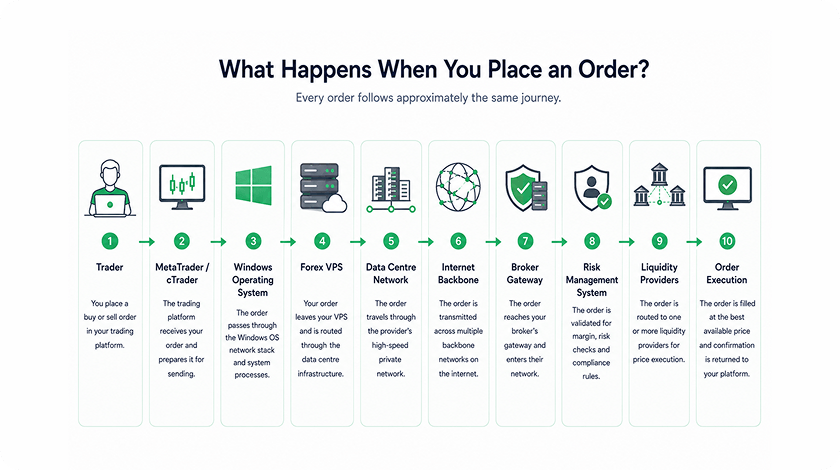
Every additional processing stage introduces a small amount of delay.
This is one reason why brokers with similar ping times can still produce noticeably different execution speeds.
Typical Latency by Data Centre
One of the biggest advantages of a Forex VPS is choosing a location close to your broker.
Approximate one-way network latency to major financial hubs:
| VPS Location |
Typical Nearby Trading Hub |
Approximate Latency* |
| London |
LD4 |
<1–2 ms |
| New York |
NY4 |
<1–2 ms |
| Frankfurt |
FR2 |
1–5 ms |
| Amsterdam |
AMS |
2–6 ms |
| Singapore |
SG |
1–5 ms |
| Tokyo |
TY3 |
1–5 ms |
*Actual latency depends on the broker’s infrastructure, routing and hosting provider.
How Much Latency Is Good?
Not every trading strategy requires institutional-level connectivity.
The acceptable level of latency depends largely on how trades are executed.
| Round-Trip Latency |
Typical Assessment |
Suitable For |
| <1 ms |
Institutional-grade |
HFT, institutional infrastructure, colocated systems |
| 1–5 ms |
Excellent |
Scalping, Expert Advisors, news trading, high-frequency automation |
| 5–20 ms |
Very Good |
Most automated strategies and active day traders |
| 20–50 ms |
Acceptable |
Manual intraday trading, swing trading |
| 50–100 ms |
Fair |
Longer-term trading where execution speed is less critical |
| 100+ ms |
Poor |
May increase execution delays for latency-sensitive strategies |
For most retail traders, achieving 1–10 ms to their broker provides an excellent balance between performance and cost.
How to Choose the Best Forex VPS
Many VPS comparison articles focus almost exclusively on hardware specifications such as RAM or storage capacity.
While hardware is important, experienced traders know that overall execution quality depends on far more than memory size or disk type.
The following factors should be evaluated before choosing a Forex VPS provider.
1. Distance to Your Broker
The most important decision is selecting a VPS located close to your broker’s trading infrastructure.
The shorter the physical network path, the lower the potential communication delay.
Always choose the VPS location first—and the hardware second.
2. CPU Frequency and Single-Core Performance
MetaTrader is not heavily multi-threaded.
Most Expert Advisors execute on a single CPU core.
For this reason, modern processors with higher clock speeds often outperform servers offering many slower cores.
Single-core performance is generally more important than simply purchasing additional virtual CPUs.
3. NVMe Storage
Storage speed has little influence on order execution itself, but fast NVMe drives significantly improve:
- Windows responsiveness
- platform startup time
- historical data loading
- backtesting performance
- log processing
4. Network Quality
Not all data centres offer identical network performance.
Look for providers that publish:
- network redundancy
- premium transit providers
- low packet loss
- DDoS protection
- multiple upstream carriers
Consistent routing is often more valuable than achieving the absolute lowest ping.
5. Uptime SLA
Infrastructure reliability should always be backed by a formal Service Level Agreement (SLA).
Look for providers offering at least 99.9% uptime, with 99.95% or higher preferred for automated trading.
6. Technical Support
Trading rarely happens during office hours alone.
Reliable 24/7 technical support can make a significant difference if your VPS becomes inaccessible while positions remain open.
Evaluate response times, support channels and technical expertise—not just availability.
7. Windows Licensing
Many trading platforms require Windows.
Some VPS providers include a licensed Windows Server installation in the monthly price, while others charge separately.
Always confirm what is included before comparing prices.
VPS Requirements
Hardware requirements vary depending on the number of trading terminals, Expert Advisors and indicators running simultaneously.
The recommendations below are suitable for most retail traders.
| Trading Setup |
Recommended RAM |
vCPU |
Suitable For |
| 1 MT4 / MT5 terminal |
2 GB |
2 |
Manual trading or one EA |
| Up to 3 terminals |
4 GB |
2–4 |
Multiple EAs or several charts |
| Up to 10 terminals |
8 GB |
4 |
Portfolio trading and multi-account setups |
| Up to 20 terminals |
16 GB |
6–8 |
Professional traders, signal providers and account managers |
These recommendations assume modern versions of MT4/MT5 with a moderate number of charts and Expert Advisors. Heavy backtesting, optimization, or resource-intensive indicators may require additional CPU and memory.
Best Forex VPS Providers
There is no single Forex VPS provider that is the best choice for every trader. The right solution depends on your broker’s location, trading style, required performance, budget and level of technical expertise.
Some providers specialise exclusively in Forex hosting and optimise their infrastructure for MetaTrader, while others offer enterprise-grade cloud servers that can be configured for trading. Before making a decision, evaluate latency to your broker, uptime guarantees, support quality, Windows licensing and scalability rather than focusing solely on hardware specifications. Cost should also be evaluated in relation to the infrastructure and services included. We explain the differences between entry-level, managed and premium trading VPS plans in our article How Much Does Forex VPS Cost in 2026? A Realistic Pricing Breakdown for Traders.
| Provider |
Best For |
Pros |
Cons |
| MyForexVPS |
Traders looking for a managed Forex VPS |
Optimised for trading, multiple global locations, 24/7 support |
Primarily focused on trading workloads |
| ForexVPS.net |
Experienced Forex traders |
Large broker network, low latency, strong reputation |
Higher pricing than many competitors |
| Commercial Network Services (CNS) |
MetaTrader users |
Integrated with MetaQuotes ecosystem, established provider |
Limited flexibility outside MT4/MT5 |
| V2 Cloud |
Traders wanting a cloud desktop |
Easy deployment, full Windows environment |
Not specifically optimised for Forex |
| Kamatera |
Custom server configurations |
Highly scalable infrastructure, flexible resources |
Requires more technical knowledge |
| Serverspace |
Cloud VPS users |
Modern cloud platform, competitive pricing |
General-purpose cloud rather than Forex-specific |
| Vultr |
Developers and advanced users |
Fast NVMe storage, many global locations |
Self-managed environment |
| DigitalOcean |
Linux-based trading infrastructure |
Reliable cloud platform, API integration |
Windows licensing incurs additional costs |
| AWS EC2 |
Professional trading infrastructure |
Enterprise reliability, global availability |
Expensive and complex for most retail traders |
How to Set Up MT4 on a Forex VPS
Installing MetaTrader 4 on a VPS is almost identical to installing it on a personal computer. After connecting to your Windows VPS through Remote Desktop, download the MT4 installation package directly from your broker, complete the installation and log in to your trading account.
Before leaving the VPS running unattended, verify that market prices update correctly, Expert Advisors are enabled (if required), AutoTrading is active and all charts load successfully. If you use custom indicators or templates, copy them to the appropriate MT4 folders exactly as you would on a local machine.
How to Set Up MT5 on a Forex VPS
MetaTrader 5 follows the same installation process as MT4 but introduces additional features such as multi-threaded strategy testing, more advanced order management and support for a wider range of financial instruments.
Once installed, connect your trading account, verify server connectivity, enable algorithmic trading if required and confirm that all Expert Advisors and custom indicators function correctly before starting live trading.
Installing Expert Advisors
A VPS provides the ideal environment for running Expert Advisors because the trading platform remains online even when your personal computer is switched off.
To install an EA, copy the compiled .ex4 or .ex5 file into the appropriate Experts directory, restart MetaTrader and attach the Expert Advisor to the desired chart. Always verify that AutoTrading is enabled, DLL permissions are configured correctly (if required) and the Journal tab shows no startup errors.
For automated strategies that manage real capital, testing the EA on a demo account before deployment is strongly recommended.
Related guide: What Is an Expert Advisor? A Practical Guide to Forex EA Trading and Automation
Running Multiple MT4 Accounts
Many traders operate several MetaTrader terminals simultaneously—for example, to separate manual and automated strategies, manage client accounts or test multiple Expert Advisors.
Each additional MT4 instance consumes processor time, memory and storage resources. Running too many terminals on underpowered hardware may result in slower chart updates, delayed Expert Advisor execution or increased CPU usage.
When managing multiple accounts, choose a VPS with sufficient RAM and modern processors, organise each terminal into separate installation folders and monitor system resource usage regularly.
Common Mistakes
Many Forex VPS issues are caused not by the VPS itself, but by incorrect configuration or unrealistic expectations.
One of the most common mistakes is choosing a VPS located thousands of kilometres away from the broker’s trading servers, increasing network latency unnecessarily. Another frequent issue is leaving automatic Windows updates enabled, which may restart the server unexpectedly during active trading sessions.
Hardware planning is equally important. Insufficient RAM, running dozens of trading terminals on a single virtual machine or overloading one disk with excessive historical data can all reduce platform performance. Finally, many traders overlook backups until hardware failure or accidental configuration changes occur.
Avoiding these simple mistakes often has a greater impact on system reliability than upgrading to more expensive hardware.
Security
Although a Forex VPS operates inside a professional data centre, securing your trading environment remains your responsibility.
Always use strong passwords for Remote Desktop access and enable two-factor authentication whenever your provider supports it. Restrict Remote Desktop access through firewall rules, keep Windows updated with security patches and disable unnecessary services that increase the attack surface.
Regular backups are equally important. Configuration files, Expert Advisors and platform settings should be backed up periodically so they can be restored quickly if required.
Good security practices reduce operational risk without affecting trading performance.
Related guide: Is Forex VPS Safe? Security Risks Every Trader Should Know
How We Evaluated Forex VPS Performance
The recommendations in this guide are based on a combination of practical experience with MetaTrader hosting environments, industry best practices, and technical documentation from trusted software and infrastructure providers.
When evaluating Forex VPS performance, we considered the factors that have the greatest impact on day-to-day trading rather than focusing solely on hardware specifications or marketing claims. These include network latency to broker trading servers, infrastructure reliability, uptime guarantees, processor performance, Windows compatibility, remote management, and the ability to support multiple trading platforms and Expert Advisors simultaneously.
Where appropriate, the guidance also reflects publicly available documentation and technical resources from MetaQuotes, Microsoft, and major cloud infrastructure providers. Throughout this guide, we distinguish between factors that a VPS can directly influence—such as network latency, system stability and platform availability—and those that depend on the broker, market conditions or execution model, including spreads, liquidity and slippage.
Because every trading environment is different, no single VPS configuration is suitable for every trader. The recommendations provided are intended to help traders select infrastructure that matches their trading style, broker location and operational requirements rather than simply choosing the most powerful or expensive server.
Final Thoughts
Choosing a Forex VPS is not simply about renting a virtual server or finding the lowest monthly price. It is about building a reliable trading infrastructure that supports your strategy under real market conditions.
Throughout this guide, we’ve explored what a Forex VPS is, how it works, why latency matters, how orders travel from your trading platform to the market, and what factors should influence your decision when choosing a provider. One key takeaway should now be clear: a VPS is not a trading strategy, and it cannot generate profits on its own. What it does provide is a stable environment that helps ensure your trading platform, Expert Advisors and automated systems continue operating exactly as intended.
For some traders, particularly those who manually execute a handful of swing trades each month, a VPS may simply offer additional convenience and remote access. For others—algorithmic traders, scalpers, money managers and anyone running multiple MetaTrader terminals—it becomes a critical part of the trading infrastructure. The more your trading depends on continuous connectivity and consistent execution, the more valuable a professionally managed VPS becomes.
It’s also important to remember that performance depends on far more than raw hardware specifications. The fastest processor or the largest amount of RAM will not compensate for poor network routing, an unsuitable data centre location or unreliable infrastructure. In many cases, selecting a VPS close to your broker’s trading servers and choosing a provider with a proven uptime record will have a greater impact on your overall experience than upgrading to a more expensive plan.
Rather than focusing solely on marketing claims such as “ultra-low latency” or “high-performance VPS,” evaluate the factors that genuinely affect trading performance: broker proximity, network quality, infrastructure reliability, technical support, scalability and long-term operational stability. These are the characteristics that determine whether your trading platform remains available when markets become volatile.
Finally, remember that every trader’s requirements are different. A VPS that is ideal for a single MT4 terminal may not be suitable for managing twenty automated strategies across multiple accounts. The best solution is the one that matches your trading style, your broker’s infrastructure and your long-term goals—not necessarily the one with the highest specifications or the lowest price.
As your trading evolves, your infrastructure should evolve with it. A well-designed VPS setup provides the flexibility to scale from a single trading platform to a professional multi-account environment without changing the way you trade.
Whether you’re just starting with MetaTrader or managing a portfolio of automated systems, investing time in choosing the right Forex VPS is ultimately an investment in the reliability of your trading operation.
Reference Sources
The technical concepts discussed throughout this guide are based on documentation and best practices from:
- MetaQuotes (MetaTrader 4 & MetaTrader 5 documentation)
- Microsoft Remote Desktop & Windows Server documentation
- Microsoft Learn
- Equinix Data Centre documentation (LD4, NY4 and other financial hubs)
- Major cloud infrastructure providers, including AWS, Microsoft Azure and Google Cloud
- General networking principles related to TCP/IP latency, routing and virtualisation