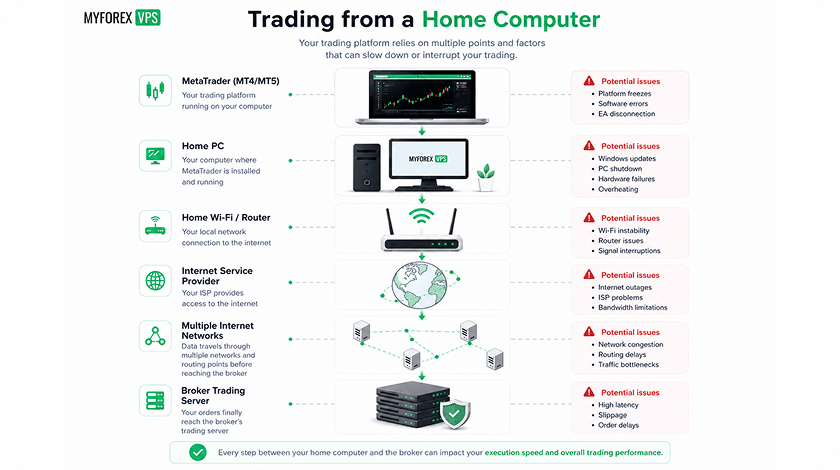
MetaTrader has its own built-in VPS hosting service. You can activate it directly from MT4 or MT5, migrate your Expert Advisors, and keep automated strategies running without leaving your home computer switched on. Some brokers even provide it free of charge.
So why would anyone pay for a separate Windows Forex VPS?
The difference is not simply price or execution speed. MetaTrader’s built-in VPS is a managed environment designed specifically for trading robots and signal subscriptions. A Windows Forex VPS is a remote computer that gives you control over the entire trading setup.
If you run one MT5 account with a compatible Expert Advisor, the integrated service may be all you need. If you manage several accounts, rely on third-party trade copiers, or use software outside MetaTrader, a Windows VPS becomes considerably more practical.
Here is how the two options compare, including their actual technical limitations, costs, and use cases.
What Is MetaTrader’s Built-In VPS?
MetaTrader Virtual Hosting is a cloud hosting service developed by MetaQuotes, the company behind MetaTrader 4 and MetaTrader 5.
Instead of renting a conventional server, installing Windows, and configuring your trading platform manually, you migrate your existing MetaTrader environment to a virtual terminal.
The service is integrated directly into the desktop platform.
To activate it, you select your trading account, register a virtual server, choose a hosting plan, and synchronize your trading environment. MetaTrader transfers the supported components needed to run your automated strategy remotely.
These include:
- Expert Advisors attached to eligible charts.
- Supported indicators used by those EAs.
- Relevant trading account settings.
- Market Watch symbols and chart configurations.
- Signal subscription settings when selected.
- Supported WebRequest permissions and notification settings.
Once migration is complete, the virtual terminal operates independently of your local computer.
You can shut down your PC without stopping the migrated trading robots.
However, you cannot open the hosted terminal through Remote Desktop, install arbitrary Windows applications, or interact with it like a normal computer.
MetaQuotes deliberately designed the virtual environment to run only the components required for automated and copy trading.
That simplicity is an advantage for some traders and a restriction for others.
What Is a Windows Forex VPS?
A Windows Forex VPS is a virtual Windows server hosted in a data center and accessed remotely over the internet.
Unlike MetaTrader Virtual Hosting, it provides an actual desktop environment.
You connect through Remote Desktop Protocol (RDP), install your trading software, configure your accounts, and run your applications much as you would on a personal computer.
A specialist Forex VPS hosting service can support multiple MT4 and MT5 terminals, third-party tools, custom indicators, trading scripts, and compatible trade copier applications.
Depending on the software requirements, a Windows VPS can also run other trading platforms, including cTrader, NinjaTrader, and broker-specific applications.
You control the installed software and can inspect the running environment directly.
This matters when automated trading extends beyond a single MetaTrader account.
For example, a trader managing three MT5 accounts with separate Expert Advisors can run three terminal installations on one adequately sized Windows VPS. With MetaTrader’s integrated hosting, each virtual terminal is associated with one trading account.
Both solutions can keep automated strategies running continuously. The difference is how much of the environment you can configure and control.
MetaTrader Built-In VPS vs Windows Forex VPS: Comparison
| Feature |
MetaTrader Built-In VPS |
Windows Forex VPS |
| Supported platforms |
MT4 or MT5 virtual terminal |
MT4, MT5 and other compatible Windows trading platforms |
| Trading accounts |
One account per virtual terminal |
Multiple accounts, subject to resources |
| Remote Desktop |
No |
Yes, via RDP |
| Expert Advisors |
Supported MT4/MT5 EAs |
Supported MT4/MT5 EAs |
| DLL-dependent EAs |
Not supported |
Supported when properly configured |
| Third-party software |
Not generally supported |
Can be installed |
| Trade copiers |
MetaTrader Signals; some EA-based solutions |
Compatible local, network and external copiers |
| Charts with EAs |
Up to 32 paid / 16 free under MetaQuotes rules |
No fixed MetaQuotes migration limit; hardware-dependent |
| Windows configuration |
Managed by MetaQuotes |
Windows access and configuration |
| Broker-server latency |
MetaQuotes selects a low-latency location |
Choose a suitable data center and measure latency |
| Setup difficulty |
Low |
Moderate |
| Cost |
Subscription or eligible free offer |
VPS subscription |
| Best suited to |
Simple, single-account automated trading |
Multi-account and customised trading environments |
The key distinction is that MetaTrader Virtual Hosting imposes platform-level restrictions, while Windows VPS limitations are primarily determined by available CPU, RAM, storage, software compatibility, and provider policies.
Neither option guarantees better trade execution or profitability by itself.
Is MetaTrader VPS Really Free?
MetaTrader’s integrated VPS is not universally free.
MetaQuotes offers paid virtual hosting, while some brokers sponsor access for qualifying customers. Free trials or promotional hosting offers may also be available, depending on current terms.
For example, tastyfx advertises free MT5 VPS access for clients who maintain an account balance of at least $1,000 and place at least one trade per month.
The service is integrated into MT5, allowing qualifying users to host compatible Expert Advisors and signal subscriptions without paying a separate VPS subscription.
However, a free broker-sponsored VPS is not necessarily free of conditions.
Before accepting an offer, check:
- Minimum account balance: Does the broker require you to maintain a specific deposit?
- Trading activity: Must you execute a minimum number of trades or reach a monthly trading volume?
- Eligibility: Is the offer available for your account type and country?
- Service limitations: Does it include the full MetaQuotes service or a restricted package?
- Cancellation conditions: What happens if you no longer meet the requirements?
These details can change, so verify them directly with the broker before committing.
A free VPS tied to trading activity is not automatically a better deal than an independent paid VPS. If you would otherwise trade less frequently, changing your trading behavior to maintain eligibility may cost more than the hosting subscription.
Likewise, traders who already meet the requirements should not pay for additional infrastructure unless they need functionality the included service cannot provide.
The Biggest Limitation: You Cannot Run Everything on MetaTrader VPS
The most important technical difference is software compatibility.
MetaTrader Virtual Hosting does not provide a general-purpose Windows environment.
DLL-dependent Expert Advisors
MetaQuotes explicitly prohibits DLL calls on its virtual hosting service.
DLLs, or Dynamic Link Libraries, allow Windows programs and trading applications to access functionality outside their own executable code.
Some Expert Advisors use DLLs for:
- External licence verification.
- Communication with third-party applications.
- Custom data processing.
- Integration with proprietary trading tools.
- Specialised trade management functions.
If a migrated EA attempts a prohibited DLL call, MetaQuotes states that the program is stopped with a critical error.
A Windows VPS does not impose that same platform-level restriction. DLL-dependent EAs can run when the required libraries are installed, the software is compatible, and the necessary permissions are enabled.
You should enable DLL imports only for trusted software because they can execute code outside MetaTrader’s normal restrictions.
Before purchasing hosting, check your EA documentation and dependencies. An EA that works on your home computer will not necessarily work on MetaTrader’s integrated VPS.
External applications and trade copiers
Not all trade copiers operate in the same way.
MetaTrader’s built-in Signals service is supported by the virtual hosting environment, and compatible EA-based copying solutions may work if they stay within its restrictions.
However, copiers that require a separate Windows application, a DLL, or communication between multiple locally installed terminals may not be compatible.
A Windows VPS provides more flexibility for these setups because the copier and its connected trading terminals can run in the same remote desktop environment.
This is particularly relevant to multi-account traders managing execution across different brokers.
How Many EAs and Trading Accounts Can You Run?
There is an important difference between the number of Expert Advisors and the number of trading accounts.
Under MetaQuotes’ published virtual hosting rules, a paid virtual terminal can migrate up to 32 charts with Expert Advisors attached. Free hosting is limited to 16.
That does not mean you can run 32 separate trading accounts.
One MetaTrader virtual terminal is associated with one trading account.
You can operate several compatible EAs within that account, subject to migration and resource restrictions. But managing several accounts simultaneously normally requires separate virtual hosting environments.
A Windows VPS handles this differently.
You can install multiple copies of MT4 or MT5 and log each into a different account. The practical limit depends on the VPS specification and the workload generated by each terminal.
For example, MyForexVPS lists the following configurations:
| Plan |
RAM |
CPU |
Suggested MT4/MT5 terminals |
| Silver |
2 GB |
2 cores |
1–2 |
| Gold |
4 GB |
2 cores |
3–6 |
| Platinum |
8 GB |
4 cores |
7+ |
These are capacity guidelines rather than guaranteed limits.
Two terminals running lightweight EAs can consume fewer resources than one terminal processing dozens of symbols with computationally expensive indicators.
If you are planning a multi-account setup, read our guide on how many MT4/MT5 terminals you can run before selecting a server.
Monitor processor utilisation, memory consumption, and platform responsiveness under real trading conditions rather than relying only on a terminal count.
Which VPS Has Lower Latency?
Both services can provide low-latency connections to broker trading servers.
MetaTrader Virtual Hosting selects an appropriate hosting location based on its connectivity to the broker’s trade server.
A specialist Windows Forex VPS provider typically lets you select a data center location, allowing you to position your server near the broker infrastructure you use.
For example, if your broker’s trading server is located in London, a London VPS may provide a shorter network path than a server in New York.
However, geographical distance does not determine latency by itself. Network routing, peering, congestion, and the broker’s actual server location also matter.
How to compare latency properly
Do not compare the ping from your home computer to one VPS with the ping from a different VPS to another broker server.
Instead, measure both services against the same broker trading endpoint.
Ideally, compare:
- Average round-trip latency.
- Latency stability during active trading sessions.
- Packet loss and connection interruptions.
- Terminal processing delays under EA workload.
- Broker execution reports, where available.
A connection showing 3 ms is not automatically better for your strategy than one showing 5 ms if the first environment frequently experiences CPU congestion or application errors.
Network latency is only one component of total trade execution time. Broker processing, liquidity conditions, and market volatility can have a larger influence on actual fills and slippage.
For scalpers and execution-sensitive EAs, stable connectivity and sufficient computing resources matter alongside low ping.
Which VPS Is Better for Your Trading Style?
The most useful way to choose is to match hosting capabilities to the way you actually trade.
1. One MT5 account running a standard EA
Recommended: MetaTrader built-in VPS, if the EA is compatible.
If your entire setup consists of a single trading account and one or two standard Expert Advisors, the integrated service is often sufficient.
You can migrate the relevant charts and EAs in a few steps without maintaining a Windows server.
If your broker includes the service at no additional cost and you already satisfy its conditions, paying for a separate VPS may provide little practical benefit.
The main reason to choose Windows instead would be a need for external software, DLL functionality, or greater control over the environment.
2. Multiple MT4 and MT5 accounts
Recommended: Windows Forex VPS.
A trader managing several accounts benefits from having multiple terminals accessible through one remote desktop.
You can install separate platform instances, configure individual EAs, monitor resource usage, and manage the complete setup from one location.
This avoids having to maintain a separate MetaTrader virtual hosting subscription for every account.
For a basic multi-terminal configuration, an appropriately sized Windows VPS is generally more convenient.
3. Prop firm trader using a trade copier
Recommended: Windows Forex VPS when the copier requires multiple terminals or external software.
Prop firm traders may operate several accounts with specific risk rules, position-sizing requirements, and platform restrictions.
A Windows VPS can support multiple terminal installations and compatible copying tools within a single environment.
MetaTrader’s integrated Signals service may be sufficient for simpler supported setups, but it cannot replace arbitrary third-party Windows software.
Before using any copier, confirm that the prop firm permits the copying arrangement and that your chosen tool complies with its account and execution rules.
4. Scalper running one lightweight EA
Recommended: Whichever service provides the more reliable, compatible setup.
Scalping does not automatically require a full Windows VPS.
A single compatible EA on MetaTrader Virtual Hosting can run close to a broker’s trading infrastructure without the overhead of managing a separate Windows desktop.
A Windows VPS becomes useful when the strategy relies on external tools, multiple broker connections, advanced monitoring, or specific software dependencies.
The better choice should be based on actual latency, stability, and EA resource requirements rather than whether the service is free or paid.
5. Trader using several platforms or custom automation
Recommended: Windows Forex VPS.
If your workflow includes MT5 alongside cTrader, NinjaTrader, external risk-management software, or a proprietary automation system, the integrated MetaTrader service is too restrictive.
A Windows VPS allows compatible applications to operate together, subject to their licensing and system requirements.
This is where a general remote desktop environment becomes more valuable than a MetaTrader-only virtual terminal.
How to Move From MetaTrader Built-In VPS to a Windows VPS
Migrating to Windows VPS hosting does not require changing brokers or trading accounts.
The main task is transferring your working environment without accidentally allowing the same strategy to run twice.
Step 1: Record your current configuration
Before changing anything, make a list of the active trading components:
- Trading account and broker server.
- EA names, versions, and input parameters.
- Active symbols and timeframes.
- Custom indicators and required files.
- Signal subscriptions or copying arrangements.
- Open trades managed by automated systems.
Pay particular attention to EAs that maintain internal state in files or global variables.
MetaTrader virtual hosting synchronisation does not work like copying an entire Windows installation. Some local files, scripts, and runtime data are not automatically migrated.
Step 2: Prepare the Windows VPS
Choose an appropriate server location and resource configuration.
Connect through RDP, install MT4 or MT5 from your broker, and update the platform to the required version.
Keep the Windows environment secure with a strong password, appropriate firewall rules, and current security updates.
Step 3: Transfer your EAs and settings
Copy your Expert Advisors, custom indicators, configuration files, and other required dependencies from the original local installation or trusted backups.
Install any required third-party applications separately.
Check software licensing before transferring commercially purchased EAs. Some products bind licences to specific computers or installations.
Step 4: Stop the original automated environment
Before activating automated trading on the Windows VPS, stop the relevant MetaTrader virtual hosting environment or disable its trading automation through the supported controls.
Do not assume that disabling AutoTrading in your local terminal will stop EAs already running on the virtual server.
MetaQuotes enables automated trading on the virtual platform independently of the local terminal’s AutoTrading setting.
Running the same EA on two active environments connected to one account can lead to duplicated trades or conflicting position management.
Step 5: Test the Windows setup
Start your trading terminal, confirm the broker connection, and verify that the EAs load correctly.
Check the Experts and Journal tabs for errors.
Where possible, test using a demo account before enabling live execution. Verify that open positions, EA identifiers, and strategy state are handled correctly.
Only enable live automated trading once you have confirmed that the original environment is no longer executing the same strategy.
How to Move From a Windows VPS Back to MetaTrader Virtual Hosting
Moving back to the built-in service is possible if the trading setup is compatible with its restrictions.
The process is different because MetaTrader virtual hosting uses its own migration system.
- Open the relevant MT4 or MT5 account in a local desktop terminal.
- Install and configure the EAs, indicators, and charts you intend to migrate.
- Confirm that none of the programs requires prohibited DLL calls or unsupported external applications.
- Register or activate MetaTrader Virtual Hosting for that account.
- Select the appropriate migration mode and synchronize the environment.
- Review the virtual terminal’s logs to confirm that the required EAs started successfully.
- Stop automated trading on the previous Windows VPS once the new environment is verified.
MetaQuotes provides different migration modes for Expert Advisors, Signals, or both.
Synchronization is one-way: from the local MetaTrader platform to the virtual terminal. It does not download the complete hosted environment back to your PC.
Changes you make to local EA settings will not automatically update the remote hosted copy. You must synchronize again.
This matters when modifying entry conditions, risk parameters, or the set of charts used by an automated strategy.
For the full technical procedure, refer to the official MetaTrader 5 migration documentation.
Is a Paid Windows Forex VPS Worth It?
A Windows VPS is worth considering when the functionality it provides solves a real limitation in your trading workflow.
For one compatible EA, paying for additional flexibility you will never use makes little sense.
But for multi-account strategies, third-party software, and custom automation, a dedicated remote desktop can reduce operational complexity.
At MyForexVPS, the Silver plan is designed for approximately one or two MT4/MT5 terminals, while Gold is positioned for setups running three to six.
Both provide Windows-based access and support for compatible trading software, with server locations in London, New York, Amsterdam, and Singapore.
The service also offers a 7-day money-back guarantee under its published terms, allowing new customers to evaluate the hosting environment and request a refund within the eligible period.
When comparing prices, calculate the cost of the complete setup rather than just one subscription.
For example, several separate MetaTrader hosting subscriptions may cost more than a single Windows VPS that has enough resources to run all the required terminals.
On the other hand, a broker-sponsored VPS that already handles your entire strategy may remain the most economical option.
The objective is not to pay for the most powerful server. It is to obtain the resources and software access your trading system actually requires.
Final Verdict: Built-In MetaTrader VPS or Windows VPS?
MetaTrader Virtual Hosting is an efficient solution for traders who want to run compatible EAs or signal subscriptions on a single account without managing a remote computer.
Its simplicity is its main strength. You prepare your environment, synchronize it, and leave the hosted terminal running.
A Windows Forex VPS offers something different: control over the software, accounts, and applications that make up your trading system.
That flexibility matters when you manage multiple accounts, run DLL-dependent EAs, use trade copiers, or combine MetaTrader with other platforms.
Choose the built-in service when your trading setup fits its limitations. Choose a Windows VPS when those limitations interfere with how you actually trade.
If you need a full Windows trading environment, explore MyForexVPS hosting plans and choose a configuration based on the number of terminals, EA workload, and broker connectivity you need.