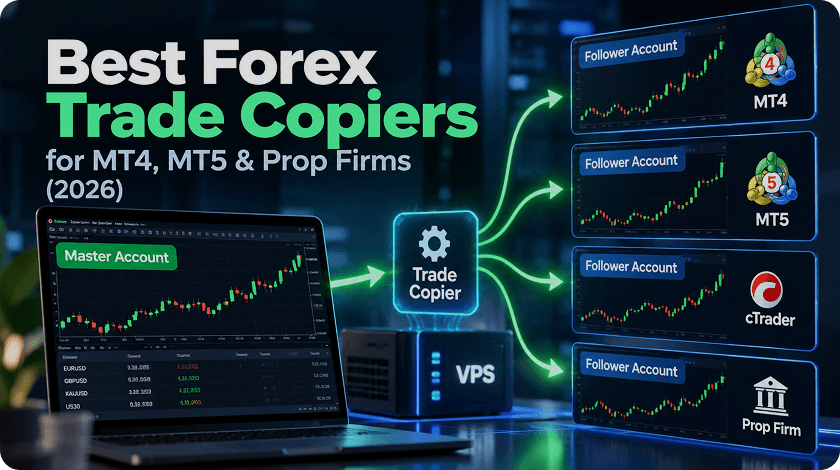
Forex trading doesn’t stop when your laptop sleeps. Running automated strategies or expert advisors (EAs) on MT4/MT5 means you need constant uptime, a stable connection, and fast order execution. That’s why traders turn to affordable Forex VPS hosting — a remote server that keeps your platform running 24/7, even if your home connection fails.
In this guide, we’ll explore the best cheap Forex VPS providers in 2025 for beginners and small-budget traders. You’ll learn how latency impacts your trades, what to expect from low-cost VPS plans, and how to test a service before paying.
Why a Forex VPS matters for MT4/MT5 traders
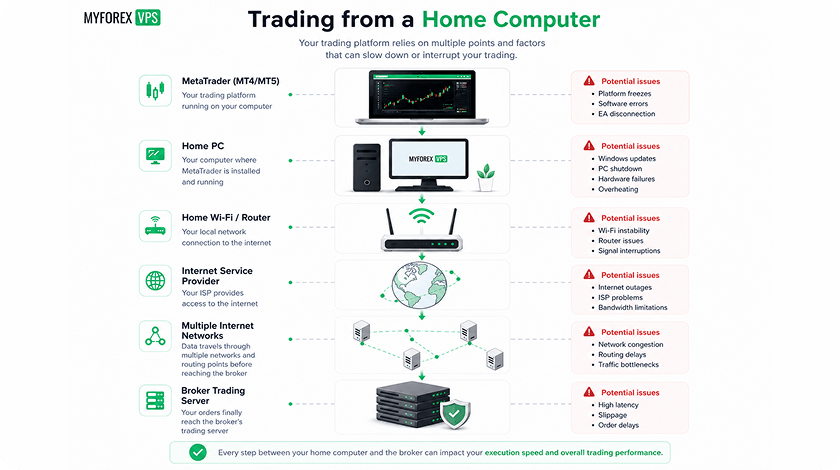
A Forex VPS (Virtual Private Server) lets you install your trading platform in a remote data center — close to your broker, online at all hours. Unlike your home computer, which can reboot, lose Wi-Fi, or go idle, a VPS keeps your MT4/MT5 terminal running uninterrupted. That’s critical for automated systems that rely on consistent uptime.
When connected to a VPS, your trades get executed without local delays. This matters even more when using EAs that open positions at precise moments or during news spikes. A VPS minimizes missed signals, skipped trades, and platform disconnects.
My Forex VPS, for example, offers affordable MT4/MT5 hosting with 99.99% uptime and low-latency data centers near major brokers. Even beginner traders get the reliability needed to test strategies in real time, without spending hundreds per month.
How low latency affects slippage and execution (scalpers vs. swing traders)
Latency is the delay between placing a trade and your broker receiving it. On a local setup, delays can reach 100ms or more. With a VPS next to your broker’s servers, that drops to as low as 1–5ms. The difference? Faster execution, less slippage, and tighter entry points, especially for scalpers.
Scalpers rely on lightning-fast fills. Even a 20ms delay can turn a profitable microtrade into a loss. That’s why low latency Forex VPS for scalping is essential. Hosting your terminal in the same financial hub as your broker, like NY4 or LD4, can save pips.
Swing traders have more flexibility. Since their trades last hours or days, a few milliseconds won’t break the strategy. For them, reliable cheap Forex VPS solutions like My Forex VPS offer a stable environment with enough speed to maintain accuracy, without overpaying for premium specs.
Cheap vs premium Forex VPS: What you actually get for the price
Not every VPS is created equal. Cheap Forex VPS hosting usually starts around $7–15/month, offering 1–2 CPU cores, limited RAM (1–2 GB), and entry-level SSD storage. It’s enough to run a single MT4/MT5 terminal with a few charts and one or two EAs. For many beginner traders, that’s all they need to get started.
What you don’t get with these plans: ultra-fast CPUs, large RAM capacity, or advanced security features. Some budget VPS providers limit network bandwidth or throttle performance during peak hours. Support may also be slower or limited to email.
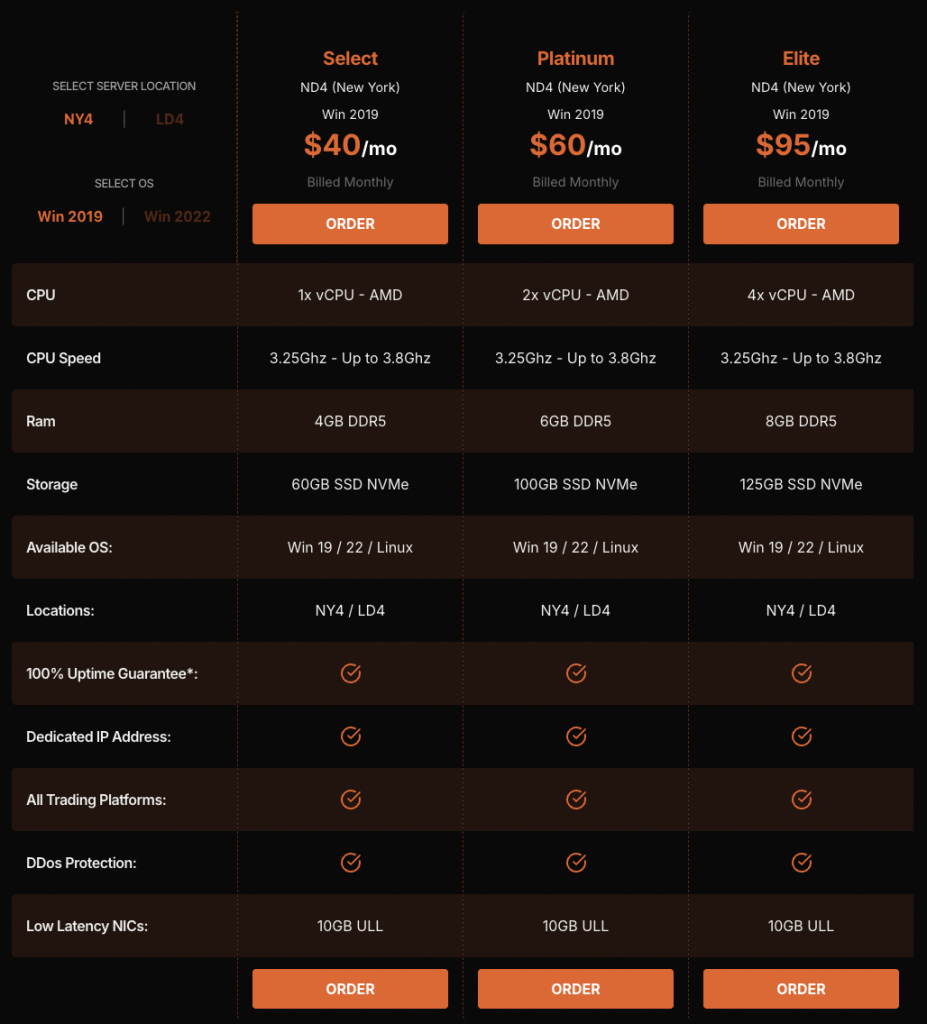
On the other hand, premium Forex VPS plans (often $30–60/month) offer dedicated resources, NVMe storage, and instant-response support. They’re optimized for institutional traders or those running complex strategies on multiple terminals.
But here’s the catch: not everyone needs premium. Services like My Forex VPS fill the middle ground. Their plans deliver low-latency connectivity, stable uptime, and enough power for retail use, without forcing you into high monthly fees. That makes them a cost-effective Forex VPS hosting solution for MT4/MT5 users who want performance on a budget.
If your strategy runs one EA on one account, a budget-friendly Forex VPS is likely all you need. If you operate several high-speed strategies, the extra cost of a pro plan might be justified. It’s not about buying the most expensive server — it’s about choosing one that matches your trading style.
Windows 2019/2022 Windows Server OsWindows 2019/2022
7+ MT4/5 Terminals7+
15 min Setup time15 min
24x7 technical support Support24x7 technical support
99.999% Uptime Guarantee99.999%
Bandwidth
RDP
myRDP
Expert Advisors
Any EA
Any Broker
Any Trading Platform
Free Setup
Ultra Low Latency
Enterprise hardware
Amsterdam
London
New York
Singapore
How to test a Forex VPS: 5 practical checks during the trial
Before paying long-term, you need to test what matters. Most cheap VPS for Forex trading services offer trials or money-back guarantees. Use that window to run these five checks:
Ping your broker. Use terminal tools or CMD to check latency. Under 20 ms is good; under 5 ms is ideal for scalping.
Run your MT4/MT5 setup. Add your indicators, EAs, and charts. See how it performs over 24–48 hours.
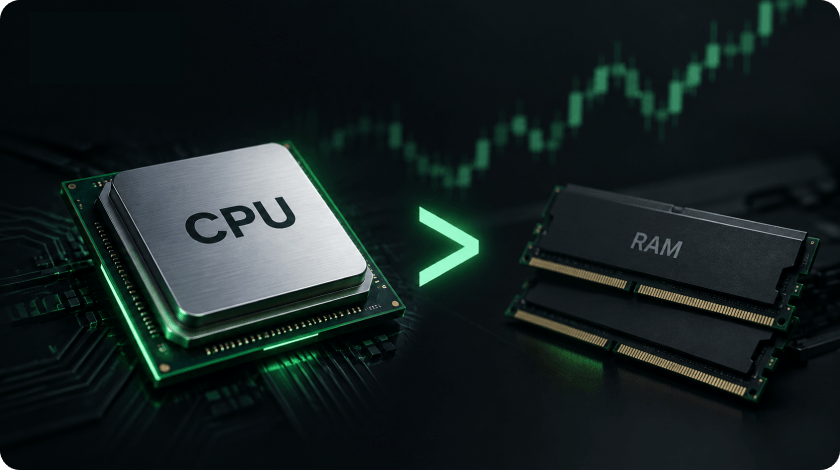
Watch the system load. Open Task Manager and track CPU and RAM usage. If you’re always near 100%, upgrade.
Monitor stability. Does the server stay online overnight? Any disconnects or auto-logouts?
Contact support. Ask a real question. Measure how fast they respond and how well they help.
My Forex VPS, for instance, offers a 7-day money-back guarantee — enough time to verify cheap VPS pros and cons before committing. If your setup runs smoothly and latency stays low, you’ve found your match.
Best cheap Forex VPS providers
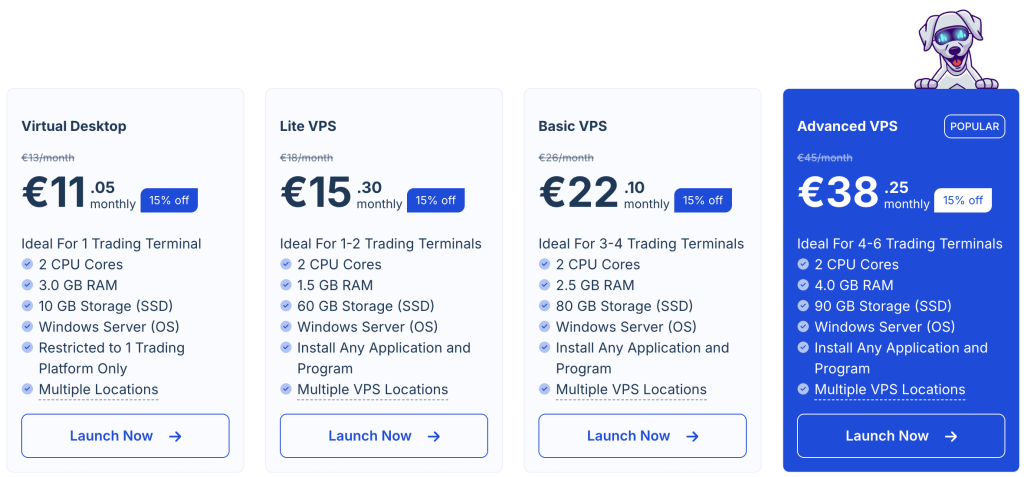
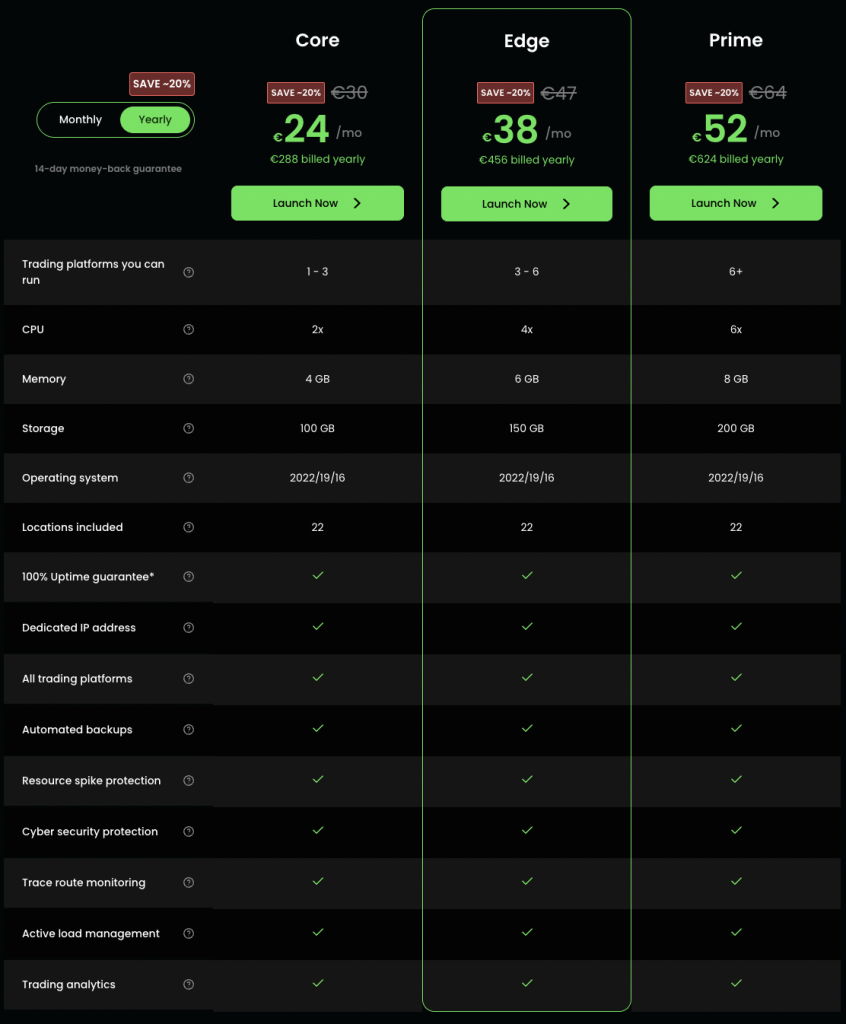
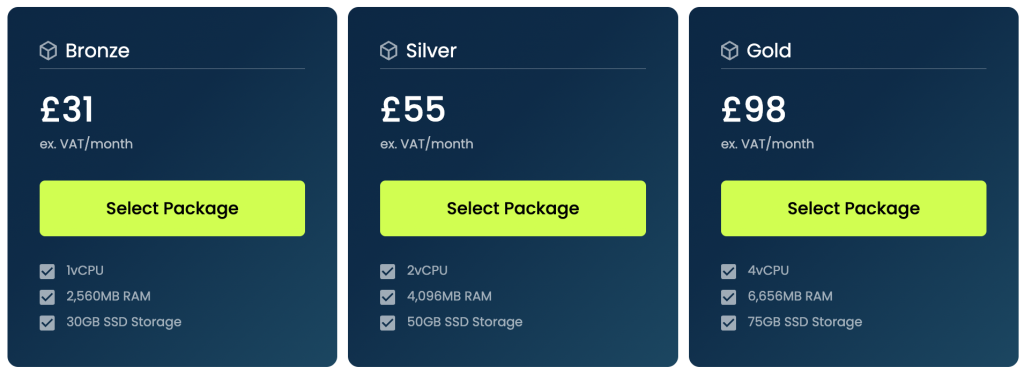
Choosing the best VPS for Forex trading on a budget means comparing more than just price. You want reliable uptime, data centers near your broker, and enough resources to run MT4 or MT5 without lag. Below is a quick comparison of top VPS options for 2025 and a brief TOP-3 review.
A standout among cheap Forex VPS hosting providers under $15, My Forex VPS strikes a balance between affordability and professional specs. With SSD storage, low-latency routing, and a clean setup for MT4/MT5, it’s well-suited for EA users and beginner traders.
Servers near top brokers (NY, London, AMS);
Pre-configured MT4/MT5-ready environment;
Reliable cheap Forex VPS for single-account traders;
7-day refund lets you test before committing.
If you want stability and speed without paying $40/month, this is a solid, affordable Forex VPS solution.
Cloudzy offers the cheapest VPS for Forex EA hosting — under $8/month with decent specs and pre-installed MT4. Good for beginners who want quick access without complex setup. Their global footprint helps traders from Asia and South America.
Known for its simplicity, FXVM provides a clear dashboard and beginner-friendly tools. Their budget VPS for MT4/MT5 works well for traders who want stable execution and auto-start features.
ForexVPS.net is one of the most established names in Forex hosting, trusted by professional traders worldwide. Their service starts at $29.99 and offers powerful resources (4GB RAM, 2 vCPU) along with more than 22 global data center locations. A standout feature is the built-in latency checker, letting you find the fastest connection to your broker instantly. With a 14-day full refund policy, it’s a solid choice for traders who value flexibility and global reach.
BeeksFX specializes in ultra-low-latency VPS hosting for serious traders. Starting from $38, it’s not the cheapest, but it provides institutional-grade infrastructure in financial hubs like NY4 and LD4. The service is tailored to high-frequency traders who demand speed and stability above all else. With a limited trial option, BeeksFX is best suited for experienced scalpers or money managers running advanced strategies.
LiquidityConnect is designed for traders who need premium connectivity to brokers and liquidity providers. With plans from $30, their VPS solutions include dedicated resources and servers in London, Tokyo, and New York. This makes them particularly strong for Asia-based traders needing fast execution in Tokyo markets. While refunds are available only by request, their performance focus makes LiquidityConnect a top pick for professional traders seeking reliability.
Setup checklist: Windows, MT4/MT5, security, and backup tips
Getting your cheap VPS for Forex trading up and running takes just 15–30 minutes, but skipping steps can cost you trades. Here’s a quick-start checklist to make sure everything works smoothly from day one.
1. Secure your VPS
Before installing MT4 or MT5, change the default RDP port (3389) and create a new user with a strong password. Turn on the Windows Firewall and disable unnecessary services. These actions reduce brute-force attacks and remote login attempts.
2. Install MT4/MT5
Download your trading platform directly from your broker’s website, not from third parties. Install it on the VPS, log in to your account, and upload your EAs or indicators. Enable auto-trading and make sure it starts automatically when the server reboots.
3. Run your strategy
Test your live or demo setup for at least 24 hours. Observe CPU and RAM load. A low-cost Forex VPS server should handle a typical chart + EA setup easily. If you experience crashes or lag, consider upgrading.
4. Back up your work
Copy your MQL4/MQL5 folder, templates, and profiles to cloud storage. This prevents data loss if your VPS crashes or you change providers later.
My Forex VPS includes a simplified Windows setup with pre-installed terminals, helping new users get started faster. It’s one of the reasons it’s often chosen as a reliable cheap Forex VPS for beginners.
Conclusion
Choosing the right Forex VPS can make the difference between smooth, profitable trading and missed opportunities. While cheap VPS plans may look attractive, many lack the stability, speed, and uptime that serious traders need. MyForexVPS.com strikes the perfect balance — offering budget-friendly plans without compromising on low latency or reliability. With data centers close to major brokers, you’ll get faster trade execution and fewer disconnects, whether you’re scalping or running swing strategies. Their 99.99% uptime guarantee ensures your MT4/MT5 platform stays online around the clock. Plus, with easy setup and responsive support, even beginners can feel confident from day one. Instead of overpaying for features you don’t need, MyForexVPS.com gives you exactly what matters most for trading success. Start your trial today and see why so many traders trust My Forex VPS as their go-to Forex VPS hosting solution.
My Forex VPS remains a smart option among the top budget Forex VPS tested in 2025. It combines speed, uptime, and support, all at a price point most traders can afford.
Under 20 ms is ideal for most traders. Scalpers should aim for <5 ms. Low latency Forex VPS for scalping works best when the server is in the same city as your broker (e.g., NY4 or LD4).
Do providers offer refunds or trials?
Yes. Discount Forex VPS hosting packages often include 3–7 day trials or money-back guarantees. My Forex VPS, for example, lets users try a plan risk-free for 7 days.
Which VPS location should I choose?
Pick a VPS closest to your broker’s server. If your broker is in London, use a UK-based VPS. If it’s in New York, use a US East Coast location. This keeps your Forex VPS low latency and reduces slippage.
Ready to trade smart?
Choosing the right VPS isn’t just about saving money — it’s about avoiding missed trades, disconnects, and downtime. Whether you’re testing a new EA or scaling a strategy, the right setup helps you trade with confidence.
Comments
No comments yet
Be the first to share your experience!
Write a review or ask a question
Rating *
Thank you for your review!
Your review has been received and will be published after moderation.
Write your question on our mail and we will answer you soon
Successfully send
Our specialist will contact you shortly
Manage your privacy
To provide the best experiences, we and our partners use technologies like cookies to store and/or access device information. Consenting to these technologies will allow us and our partners to process personal data such as browsing behavior or unique IDs on this site and show (non-) personalized ads. Not consenting or withdrawing consent, may adversely affect certain features and functions.
Click below to consent to the above or make granular choices. Your choices will be applied to this site only. You can change your settings at any time, including withdrawing your consent, by using the toggles on the Cookie Policy, or by clicking on the manage consent button at the bottom of the screen.
Functional
Always active
The technical storage or access is strictly necessary for the legitimate purpose of enabling the use of a specific service explicitly requested by the subscriber or user, or for the sole purpose of carrying out the transmission of a communication over an electronic communications network.
Preferences
The technical storage or access is necessary for the legitimate purpose of storing preferences that are not requested by the subscriber or user.
Statistics
The technical storage or access that is used exclusively for statistical purposes.The technical storage or access that is used exclusively for anonymous statistical purposes. Without a subpoena, voluntary compliance on the part of your Internet Service Provider, or additional records from a third party, information stored or retrieved for this purpose alone cannot usually be used to identify you.
Marketing
The technical storage or access is required to create user profiles to send advertising, or to track the user on a website or across several websites for similar marketing purposes.
To provide the best experiences, we use technologies like cookies to store and/or access device information. Consenting to these technologies will allow us to process data such as browsing behavior or unique IDs on this site. Not consenting or withdrawing consent, may adversely affect certain features and functions.
Functional
Always active
The technical storage or access is strictly necessary for the legitimate purpose of enabling the use of a specific service explicitly requested by the subscriber or user, or for the sole purpose of carrying out the transmission of a communication over an electronic communications network.
Preferences
The technical storage or access is necessary for the legitimate purpose of storing preferences that are not requested by the subscriber or user.
Statistics
The technical storage or access that is used exclusively for statistical purposes.The technical storage or access that is used exclusively for anonymous statistical purposes. Without a subpoena, voluntary compliance on the part of your Internet Service Provider, or additional records from a third party, information stored or retrieved for this purpose alone cannot usually be used to identify you.
Marketing
The technical storage or access is required to create user profiles to send advertising, or to track the user on a website or across several websites for similar marketing purposes.


 RAM
2 GB
RAM
2 GB
 CPU
2 cores
CPU
2 cores
 HDD
50 GB SSD
HDD
50 GB SSD
 Windows Server Os
Windows 2019/2022
Windows Server Os
Windows 2019/2022
 MT4/5 Terminals
1-2
MT4/5 Terminals
1-2
 Setup time
15 min
Setup time
15 min
 Support
24x7 technical support
Support
24x7 technical support
 Uptime Guarantee
99.999%
Uptime Guarantee
99.999%

 Bandwidth

 RDP
RDP
 myRDP
myRDP
 Expert Advisors
 Any EA
 Any Broker
 Any Trading Platform
 Free Setup
 Ultra Low Latency
 Enterprise hardware
 Amsterdam
 London
 New York
 Singapore